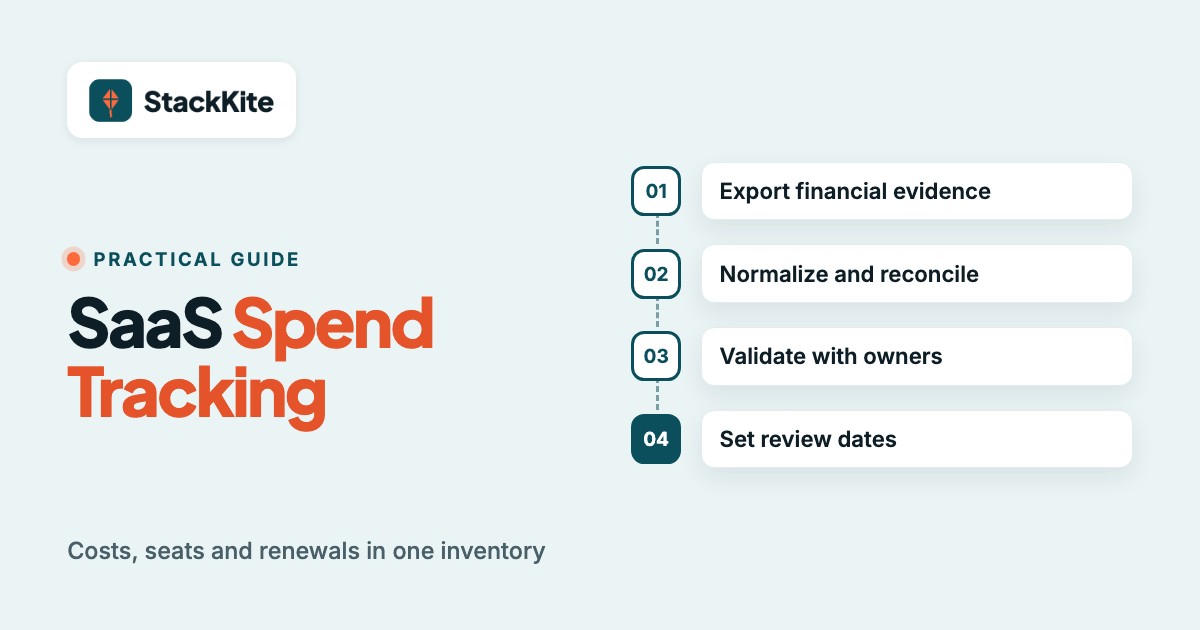
SaaS spend tracking is the practice of recording every paid software subscription, reconciling it to actual payments and reviewing its cost, usage and renewal terms. Start with a single inventory that names an owner for every app. Then match invoices to that inventory, normalize the billing periods and set a decision date before each cancellation deadline.
A bank export alone won't show who owns a tool or whether its seats are being used. An SSO app list won't catch every employee purchase either. You need both financial evidence and a human owner, even if your company is small enough to run the process in a spreadsheet.
- List every app, vendor, owner, payment method, seat count, renewal date and notice deadline.
- Reconcile card and accounts-payable charges to contracts and normalize monthly and annual costs.
- Separate committed cost from actual cash paid, and separate purchased seats from active users.
- Review renewal decisions before the notice period closes, not when the invoice arrives.
- Keep a monthly change log so finance can explain new spend, cancellations and plan upgrades.
What SaaS spend tracking includes
SaaS spend tracking covers the software inventory, payment evidence, budget, license usage and contract commitments. It answers what the business pays, who requested it, who still needs it and when the company can change the deal. A good register connects all of those questions to the same application record.
The term is narrower than full SaaS spend management. Tracking makes the facts visible and reviewable. Management adds procurement controls, automated discovery, negotiations, license reclamation and governance workflows. You can start tracking without buying a large platform, but you can't make reliable savings decisions without trustworthy tracking data.
What every SaaS inventory record needs
A SaaS inventory is useful when every application has a recognizable vendor, a business owner, a financial owner, a contract or billing reference and a next action date. The financial record and the operational record shouldn't live in unrelated spreadsheets. Otherwise a renewal discussion becomes an exercise in identifying which invoice belongs to which team.
The minimum fields are application name, vendor legal name, department, internal owner, billing currency, payment method, contract ID, billing frequency, amount, purchased seats, active seats, renewal date, notice deadline and status. Add invoice links and a last-reviewed date when the team can maintain them. Don't invent a renewal date if the contract isn't available. Mark it unknown and assign an owner to find it.
Why bank statements and SSO logs disagree
Bank statements prove money moved, while identity provider logs show a subset of application access. They won't necessarily agree because annual invoices, reseller charges, departmental cards and personal expense reimbursements don't appear in the same place. SSO also misses tools that use passwords, personal logins or service accounts.
Zylo's own discovery process combines financial systems, expense reports and SSO logs rather than relying on one of them. For a small company, that translates into a practical rule: use card and AP data to find paid subscriptions, then ask department owners to confirm access, seats and purpose. A tool with no SSO entry isn't automatically unused, and a tool with an SSO entry isn't automatically paid. If you can't trace a payment, don't assume the application is free. If you can't trace a login, don't assume the contract is unused.
How to track SaaS spending step by step
Track SaaS spending by building the inventory first, then reconciling payments, normalizing costs, confirming ownership and reviewing renewals. A repeatable process matters more than the tool used to store the data. You can complete the first pass with a CSV export, an accounts-payable report and a short owner survey.
Export financial evidence
Collect corporate card transactions, AP invoices, expense reimbursements and known reseller bills for the same period. Keep original amounts and currencies.
Identify and deduplicate vendors
Group merchant aliases and invoice entities under a canonical vendor, but preserve the original merchant string for auditability.
Create one application record
Assign a business owner, department, payment source, contract link, billing frequency, seats, renewal date and notice deadline.
Normalize and reconcile
Calculate annualized run rate separately from actual cash paid. Match every recognized software charge to an app or an investigation queue.
Validate with owners
Ask owners to confirm purpose, purchased seats, active seats, alternative tools and the next renewal decision.
Set review dates and maintain changes
Schedule a decision before the contractual notice deadline. Record changes, owners and supporting evidence each month.
Start with transactions, not employee guesses
A transaction-first pass is faster than asking everyone to remember the apps they use. Pull the last complete period of corporate card and AP data, then search merchant names for software, hosting, productivity and AI vendors. Include employee reimbursements and purchases routed through resellers, since those can hide the product name.
Don't automatically classify every charge from a technology vendor as a SaaS subscription. A single invoice might contain hardware, professional services or usage charges. Keep the invoice line description, classify the expense and flag ambiguous items for review. The goal isn't a perfect taxonomy on day one. It's a traceable answer to where each dollar went.
Normalize merchant names without losing evidence
Merchant normalization maps several payment labels to one vendor record. For example, a card might show a processor descriptor, while an invoice names the software company. Store both the canonical vendor and the raw transaction text. Otherwise the next month can look like a new subscription even though the merchant merely changed its billing descriptor.
Use a review queue for uncertain matches. A recurring charge with a similar amount isn't enough proof that two transactions belong to the same application. Merging them on that basis erases the billing identity you need to reconcile a contract. Check invoice IDs, billing account emails and contract references. When two departments buy separate workspaces from the same vendor, keep separate subscription records under the same vendor rather than merging their seat counts into one contract.
Assign owners who can make a decision
A business owner confirms whether the tool is needed. A finance owner validates the cost and payment source. IT or security may own access and offboarding, but that doesn't make IT the commercial owner of every marketing subscription. Write the names down rather than assigning a department label alone. If the owner can't approve a change, the record isn't owned in a practical sense.
If an owner has left, treat the record as an exception. The replacement owner should verify the account administrator, invoice recipient and cancellation rights. Without those details, a company can see a charge but still be unable to change the subscription before it renews.
SaaS spend tracking spreadsheet fields and formulas
A SaaS spend tracking spreadsheet needs enough columns to reconcile spending and trigger decisions, but not so many that owners stop updating it. Separate stable application attributes from changing payment and seat data. A single row per subscription is a good starting point for a small stack, while a transaction tab preserves the payment history.
| Field | Example value | Why it matters |
|---|---|---|
| Application | Project collaboration tool | Human-readable inventory entry |
| Canonical vendor | Example Software Inc. | Groups payment aliases |
| Department and owner | Operations, named manager | Decision accountability |
| Billing frequency | Annual | Normalization and cash planning |
| Contracted amount (USD) | $2,400 | Illustrative contract commitment |
| Annualized run rate (USD) | $2,400 | Comparable portfolio cost |
| Purchased and active seats | 20 purchased, 14 active | Utilization check |
| Renewal and notice dates | June 30, May 31 | Decision timing |
| Payment method and invoice link | Corporate card, invoice record | Reconciliation evidence |
| Last reviewed and status | October 26, active | Freshness and next action |
The values in this table are illustrative, not vendor prices or a benchmark of typical software spending. A business should substitute its own contracts and record the currency in which it is actually billed.
Calculate annualized spend without confusing it with cash
Annualized spend expresses a recurring subscription on a comparable twelve-month basis. For a monthly flat fee, multiply the recurring amount by twelve. For an annual contract, use the annual recurring commitment. For a quarterly contract, multiply the recurring quarter by four. A usage-based bill needs a forecast or trailing average with a clear label rather than pretending the latest invoice is fixed.
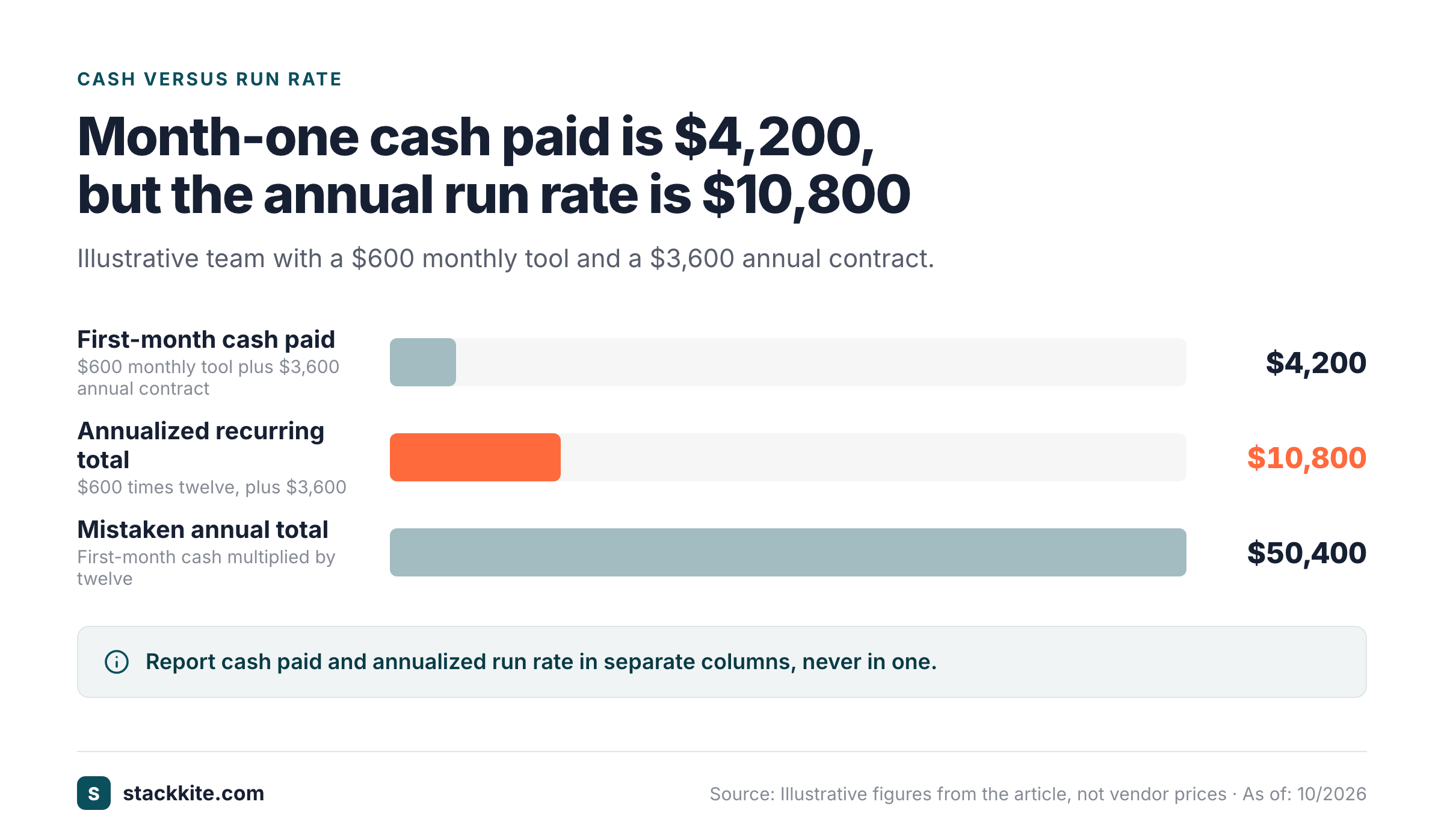
The cash view answers a different question: how much did the company pay during the period. An annual prepayment can create a large cash outflow in one month while its normalized run rate stays unchanged. Don't mix the two in one column. If you need accounting expense recognition, follow your organization's accounting policy and don't treat this operational worksheet as a substitute for the general ledger.
Illustrative example: a team pays $600 per month for one tool and $3,600 annually for another. Its annualized recurring total is $10,800: $600 multiplied by twelve, plus $3,600. The first month's cash payment could be $4,200 if the annual contract is charged then, but that doesn't mean the recurring annualized total suddenly became $50,400.
Calculate cost per active seat and utilization
Seat utilization compares active seats with purchased seats, using a consistent activity definition. For an illustrative subscription with 20 purchased seats and 14 active users, utilization is 70%. If the annual contract costs $2,400, the effective annual cost per active seat is about $171.43, not the nominal $120 per purchased seat.
Those figures are arithmetic examples, not an industry utilization benchmark. Define active carefully: a login in the last thirty days may work for a daily collaboration app, while quarterly tax software needs a longer window. A user who hasn't logged in may still hold a necessary admin or service account. A low percentage should trigger a review, not an automatic deprovisioning job. Don't remove an account before you've checked whether it's a necessary administrator or occasional-use license.
How to reconcile SaaS invoices with the budget
Reconcile SaaS invoices by matching each charge to a subscription record, comparing the billed amount with the contract and explaining any difference. Keep a separate budget view that shows approved annual cost, forecast cost, actual payments and remaining commitments. The reconciliation should end with an owner and an explanation for every material exception. An unmatched charge without an owner will still be unmatched next month.
The exception categories are predictable: a new vendor, an unexpected plan upgrade, added seats, consumption overage, foreign exchange movement, tax difference, duplicate charge or an invoice without an owner. Don't hide an unexplained difference inside a miscellaneous category. It will return at the next renewal when nobody remembers why the invoice changed.
Use a three-way match for larger contracts
For a material contract, match the agreement, the invoice and the subscription inventory. The contract tells you what was authorized, the invoice tells you what the vendor charged and the inventory tells you which team owns the software and whether the seat count still fits. If a purchase order exists, include it in the evidence trail.
The match doesn't need to be automated at first. A monthly review can flag any invoice whose amount or billing period changed unexpectedly. Don't assume a price increase is wrong until you check the contract, but don't accept it as valid merely because a card payment succeeded. Record the approved change and who authorized it. A successful payment doesn't establish that the plan change was approved.
Keep committed, forecast and actual spend separate
Committed spend is the amount the company is contractually obligated to pay, subject to the contract terms. Forecast spend estimates what the business expects to pay. Actual spend is what has been billed or paid during the period, depending on the chosen accounting view. Each is useful, but the labels shouldn't be interchangeable.
A flexible monthly subscription may have a high annualized run rate and little noncancelable commitment. An annual prepaid agreement may have the opposite cash pattern. Finance needs both when deciding whether a cancellation saves cash this quarter or only avoids next year's renewal. A cancellation won't produce an immediate refund unless the contract provides one. If the contract has a minimum commitment, a license reduction won't necessarily lower the current term's cost.
How to track SaaS renewals and cancellation notice periods
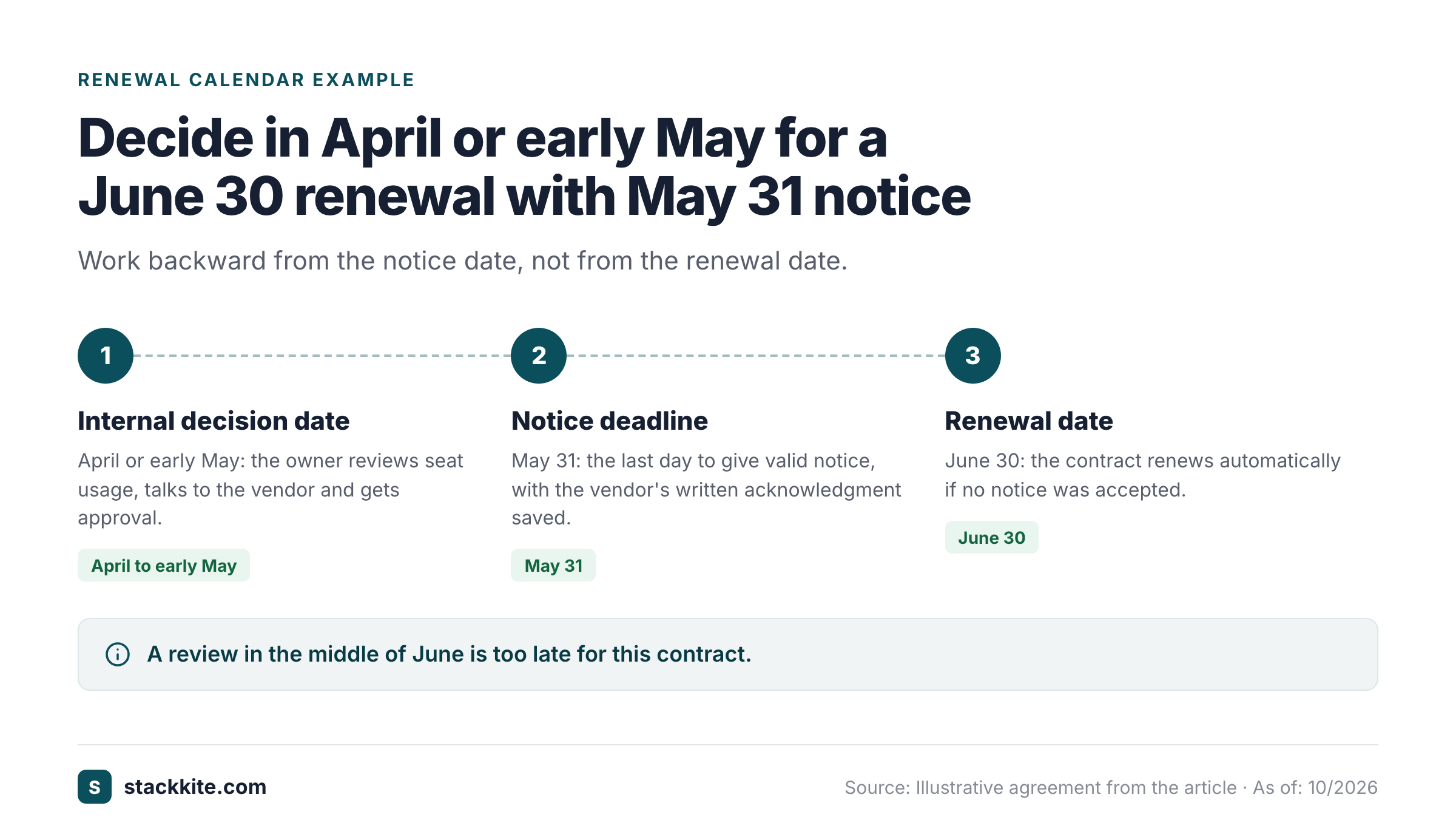
Track SaaS renewals with two dates: the renewal date and the last date to give valid notice. The cancellation notice date is often the more urgent one. A reminder that arrives on the renewal date can be useless if the contract required earlier notice.
For each subscription, record the notice period in days, the required method of notice and the contract clause or help article that supports it. Then calculate an internal decision date earlier than the notice deadline so the business owner has time to review usage and obtain approval. Keep the vendor's written acknowledgment as proof that the cancellation was accepted; a sent email isn't one.
Build a renewal calendar backward from the deadline
Start with the contract, not a default thirty-day assumption. If an illustrative agreement renews on June 30 and requires notice by May 31, a review in the middle of June is too late. Put the internal decision date in April or early May, assign an owner and keep the supporting agreement beside the record.
BetterCloud's renewal guidance links contract data, usage and advance reminders, and suggests starting renewal work 90 to 120 days before expiration. For a small team the exact number matters less than the fact that the workflow must finish before the legal deadline, with enough lead time for a seat audit, a vendor conversation and internal sign-off.
Record the decision, not just the reminder
A renewal record should end with one of four decisions: renew as is, rightsize, renegotiate or cancel. Include the decision maker, date, expected financial impact and evidence. If a vendor offers a discount verbally, don't enter the saving as committed until it appears in a written agreement.
A missed notice period is a process failure even if the app is still useful. Track missed deadlines as exceptions so the team can change the review cadence. Judge renewal tracking by decisions made before the deadline, not by the number of reminders sent.
How to find unused licenses and duplicate software
Find unused licenses by comparing purchased seats with assigned and active users, then asking the owner whether those assignments still serve a business need. Duplicate software requires a second check: two products may share a category while supporting different teams, data boundaries or workflows. A cancellation decision needs both usage evidence and an impact assessment.
A license report can identify seats that look inactive, but it won't tell you whether the user needs occasional access for a critical task. Check the vendor's definition of active use, remove departed employees through the approved access process and document any exceptions. Don't count reclaimed seats as cash savings until the contract or next renewal actually reduces the bill.
A practical license review
Use a small sample before expanding the process. Choose a high-spend app, export purchased and assigned seats, compare them with a suitable activity window and ask the business owner to approve removals. Record how many seats were reassigned, removed or retained with a reason.
If a product bills in seat bands, removing one account might not change the invoice. The financial impact appears only when the company can move to a lower tier or negotiate a smaller commitment. That's why the seat audit belongs next to contract terms and renewal timing, not in a disconnected IT report.
A duplicate-tool review
Start with business capability, not vendor labels. Two meeting tools might overlap in recording but differ in customer consent controls, transcription languages or integration needs. Two project tools may have distinct external-client and internal-use requirements. Ask which workflow would fail if one were removed.
When the overlap is real, estimate the transition effort, data export needs and user training before claiming savings. A tool that's cheap to cancel but expensive to migrate may not be the first target. Keep the comparison in the inventory so the same consolidation idea isn't reopened every quarter without new evidence. Don't force consolidation if the replacement can't preserve required data.
How to identify shadow SaaS and employee-paid AI tools
Identify shadow SaaS by reviewing expense reports, card merchants, employee reimbursements and owner declarations that don't match the approved software list. Include AI assistants, browser tools, meeting helpers and consumption-based API services. The objective is to discover unmanaged costs and data access, not to accuse employees who solved a real problem with an unapproved purchase.
Ask employees to identify the business purpose, account administrator and data involved. A useful policy gives them a route to register a tool instead of forcing every purchase into a hidden personal account. If registration isn't straightforward, employees won't reliably report the tools they're already using. Finance can then decide whether the spend belongs in the central budget, while IT or security reviews access and data handling.
Track AI subscriptions and usage-based charges separately
AI spend can be seat-based, credit-based, token-based or a hybrid. A fixed chat subscription behaves differently from an API bill that changes with consumption. Record the pricing model, budget owner, billing account and any available usage alerts. Don't forecast a variable bill from the latest month alone when the workload is changing.
Zylo's product pages describe monitoring of AI and consumption-based spend alongside traditional SaaS. A smaller company doesn't need the same automation to adopt the principle. Set a monthly budget and a named reviewer, then compare the forecast with the invoice and explain the largest changes. If a provider offers hard spending limits, record whether the account owner enabled them. Don't confuse a dashboard alert with a hard limit. A warning won't stop the next bill unless the provider enforces it.
Which SaaS spend tracking metrics matter?
The useful SaaS spend tracking metrics are total annualized recurring spend, actual cash paid, committed spend, active-seat utilization, upcoming renewal exposure and unresolved transactions. These metrics answer different questions, so a single headline total can't replace them. Add cost per active seat where the data supports it.
| Metric | Formula or definition | Review owner |
|---|---|---|
| Annualized run rate | Sum of normalized recurring costs | Finance |
| Actual cash spend | Payments in the selected period | Finance |
| Committed spend | Remaining noncancelable contract obligations | Finance and legal |
| Seat utilization (%) | Active seats divided by purchased seats | IT and app owner |
| Cost per active seat (USD) | Annual contract cost divided by active seats | Finance and app owner |
| Renewal exposure (USD) | Contract value reaching a decision window | Finance and procurement |
| Unmatched charges | Transactions with no confirmed app or owner | Finance operations |
Don't present utilization or cost per active seat as an exact measure when a vendor won't provide reliable activity data. Mark it unknown. A dashboard with honest gaps is better than a polished chart that treats assigned accounts as active users. Purchase counts alone can't show utilization.
Add a monthly movement bridge
A movement bridge explains why the portfolio total changed. Begin with last month's normalized recurring spend, then add new subscriptions, upgrades and seat increases. Subtract cancellations, downgrades and realized contract reductions. Keep currency effects and usage-based charges visible rather than burying them in a generic adjustment.
An illustrative bridge could start at $12,000 per month, add a $300 new tool, subtract a $200 downgrade and finish at $12,100. That doesn't prove a saving by itself. It explains the change and gives the finance owner a short list of contracts to inspect. Reconcile the bridge against the inventory before sharing it with management.
SaaS spend tracking tools: spreadsheet, inventory app or full platform
Choose the tracking tool based on the size of the stack, available data and the work your team can maintain. A spreadsheet is enough when ownership is clear and updates are regular. A lightweight inventory app adds shared records and reminders. A full SaaS management platform is more useful when the business needs automatic discovery, integrations, license activity data and centralized workflows.
A simple inventory shouldn't be described as automatic discovery. If you're entering data manually, the tool won't find a missing purchase on its own. That's why monthly reconciliation still matters. StackKite, a SaaS inventory and renewal workspace, records apps, owners, costs, purchased and active seats, notice deadlines and reminders. It supports CSV import and manual entry, but it doesn't automatically discover apps or negotiate contracts. That makes it a fit for teams that can collect their own source data and want a shared operating register.
What a spreadsheet can do well
A spreadsheet is flexible, transparent and cheap to start. It can hold the inventory, normalized costs, payment references and review dates. The main risk isn't the spreadsheet format itself. It's missing ownership, inconsistent definitions and an update process that depends on one person remembering to open it.
Protect the canonical file, limit editing rights and keep change history. Add validation for billing frequency and status fields. Use a separate transaction tab so the inventory doesn't grow into a row for every invoice. If the team can't maintain a monthly reconciliation, more columns won't fix the problem.
When automation earns its cost
Automation earns its cost when manual discovery or seat reviews are consistently incomplete, or when many contracts require coordinated decisions. Enterprise products such as  Zylo and
  BetterCloud can connect financial and identity signals to usage and contract workflows, depending on the purchased modules. Verify their actual integration coverage, permissions and quote before assuming every source will sync.
A useful evaluation test is whether the platform can resolve a specific exception: an unknown card charge, an unused seat or an approaching notice deadline. If the demo can't resolve a real exception, a long feature list isn't evidence of value. Check that the deployment doesn't depend on finance permissions you can't get. Ask for a proof of concept using the messiest real records, not a vendor's demonstration data.
A worked SaaS spend tracking example for a growing team
A worked SaaS spend tracking example shows why payment totals, run rate and renewal decisions must be separate. Consider a fictional company with an annual collaboration contract, a monthly analytics subscription and a variable AI API bill. The figures below are illustrative and are not claims about any vendor's prices.
| Example | Billing pattern | Annualized view (USD) | Review action |
|---|---|---|---|
| Collaboration suite | $4,800 annual contract | $4,800 | Confirm seats before notice date |
| Analytics platform | $250 monthly subscription | $3,000 | Check duplicate analytics tools |
| AI API | $100 to $500 variable monthly | Forecast separately | Set owner and usage alert |
The fixed subscriptions create a $7,800 annualized recurring baseline. The API isn't a fixed contract, so it belongs in a forecast range rather than the same deterministic run-rate calculation. If the company paid the collaboration invoice this month, cash spend may spike even though its annualized baseline hasn't changed.
The owner finds that the collaboration suite has 30 purchased seats but only 22 users active in the relevant review window. The utilization calculation is about 73%. That is a prompt to inspect the contract, not a promise that the company can cut the bill by 27%. A seat band, annual minimum or specialized account might prevent immediate savings.
The analytics owner confirms that a second team has a separate subscription to a similar product. Finance records the possible overlap, asks about required features and assigns a decision before the next notice date. The AI owner then checks consumption alerts because the variable bill could exceed its planning range. The estimate isn't a cap unless the vendor enforces one. Each decision now has a different evidence trail.
Common SaaS spend tracking mistakes and how to avoid them
The most damaging SaaS spend tracking mistakes are incomplete payment coverage, missing contract dates, false precision about utilization and confusing savings opportunities with realized reductions. They usually come from a broken handoff between finance, IT and app owners. A monthly review can catch them before they become annual commitments.
- Reconcile new card, AP and reimbursement transactions to a named application.
- Investigate charges without a contract, owner or recognizable merchant.
- Confirm new tools and plan changes with their business owners.
- Refresh purchased seats and active usage where evidence exists.
- Check notice deadlines and assign renewal decisions before they close.
- Separate realized savings from proposed seat reductions.
- Update the spend bridge and archive the supporting invoices.
- Record unresolved exceptions with a person and a due date.
Don't count a cancellation request as a saving
A cancellation request isn't a realized saving until the subscription is terminated or the future commitment is reduced. Keep the confirmation, effective date and financial impact. If a prepaid contract remains active until the next term, describe the change as cost avoidance at renewal rather than cash returned today.
Likewise, removing an inactive seat from the admin console may have no financial effect until the contract's minimum changes. Finance should approve the savings classification, while the app owner confirms that the seat removal didn't interrupt a necessary workflow.
Don't treat the inventory as a one-time audit
A SaaS inventory becomes stale when new purchases, departures and renewals don't update it. If an app doesn't have a last-reviewed date, it isn't ready for a renewal decision. Make registration part of the purchase request and offboarding process. Assign a monthly reconciliation owner and give every app a last-reviewed date.
A monthly review isn't a substitute for a timely renewal decision. Keep the deadline reminders active between reconciliations. If a vendor's cancellation clause is unclear, escalate it rather than guessing a notice period.
Frequently asked questions about SaaS spend tracking
SaaS spend tracking questions usually concern the difference between expenses and commitments, how often to reconcile, what data to collect and whether automatic discovery is required. The answers depend on the company's contracts and data access, but the basic inventory and reconciliation principles are consistent.
What is SaaS spend tracking?
SaaS spend tracking records paid software, owners, billing amounts, seats and contract dates, then reconciles that inventory with financial transactions.
How do I track SaaS expenses without dedicated software?
Track SaaS expenses in a spreadsheet with one row per subscription and a separate transaction tab. Reconcile card, AP and expense data each month.
How often should a business review SaaS spend?
A business should reconcile SaaS charges monthly and review renewals before each contractual notice deadline. High-variance usage charges may need more frequent checks.
Does SaaS spend tracking show unused licenses automatically?
SaaS spend tracking doesn't automatically reveal unused licenses unless the data source supplies reliable user activity. Manual inventories need owner or admin exports for that check.
What is the difference between SaaS spend tracking and SaaS spend management?
SaaS spend tracking records costs and commitments. SaaS spend management uses that information to control purchases, optimize seats, handle renewals and govern the software portfolio.
The next action for a reliable SaaS spending record
The next action for SaaS spend tracking is to reconcile one complete billing period and assign owners to every unmatched charge. Add renewal and notice dates before trying to optimize every seat. A small accurate inventory is more valuable than a large catalog nobody maintains. Missing owners won't be fixed by another dashboard, and a forecast needs reconciled data.
Once the monthly reconciliation works, introduce utilization checks, spend forecasts and renewal decisions. Keep a clear boundary between what you know, what you've estimated and what still needs a contract or vendor confirmation. That's how software spending becomes a set of manageable decisions instead of a surprise in the next budget meeting.