
SaaS license management is the process of matching paid software entitlements to people who need them, checking actual use and changing the next purchase or renewal accordingly. A reliable process connects the contract, the administrator's assignment list, evidence of activity and the finance record. It doesn't assume that an unused login is automatically a seat you can cancel.
A team can have accurate invoices and still have a license problem. The invoice says what the company bought, but it doesn't say who needs access next quarter. A directory says who can sign in, yet it doesn't prove that every assigned seat is being used. License management closes that gap and turns it into a documented spending decision.
- Keep purchased, assigned and actively used seats as separate fields.
- Review the business need before removing access or changing a plan.
- Check the contract's reduction window before counting savings.
- Assign a named owner to each application and every renewal decision.
- Use a repeatable ledger and a monthly review instead of an annual scramble.
What is SaaS license management?
SaaS license management is the ongoing control of software access, entitlements, utilization and the cost of subscriptions. It covers the period after a tool is purchased, when employees join or change roles, and when the company can renegotiate or reduce its commitment. It's narrower than general SaaS spend management because it concentrates on seats, plan levels and license terms.
The goal isn't to make every employee use every product every day. It's to understand what the company pays for and what it can change. A license that's essential but rarely used isn't automatically waste.
A finance owner wants to know whether the bill matches the agreement. IT wants to know which accounts are assigned and whether access is appropriate. A department manager wants colleagues to keep the features they need. Those are different questions, but they should lead to one shared decision record. Without that record, an account can be deactivated while the company keeps paying for the seat.
A procurement record can't answer an access question by itself. Finance doesn't see every administrator change, and IT won't always see a purchase made on a corporate card. That's why the review needs both teams rather than another isolated spreadsheet.
The distinction also matters for software asset management. The CIS Controls include an inventory and control of software assets. That security inventory helps identify authorized software, but a SaaS cost review needs extra fields such as contract quantity, billing unit and renewal terms. Don't treat a list of installed applications as proof of paid license use.
A license review should answer four practical questions in order. Start with what the company contracted to buy, then who currently has access, which features are used for a real job and when the bill can change. The first three identify a possible action. The last one determines whether the action saves money now, later or not at all.
Which license counts should I track?
A useful SaaS license ledger tracks purchased, assigned, active and reclaimable seats separately. Each count describes a different stage in the spending decision. If you merge them into one number, you'll miss both idle capacity and legitimate business exceptions.
| License measure | What it means | Owner of evidence | Spending decision |
|---|---|---|---|
| Purchased seats | Contracted quantity on the order or invoice | Finance or procurement | Determines the committed cost |
| Assigned seats | Accounts with an entitlement or assigned license | IT or application administrator | Shows provisioned capacity |
| Active seats | Users with relevant activity during an agreed review window | Application owner | Indicates adoption, not necessarily need |
| Reclaimable seats | Assigned seats confirmed as no longer required | Business owner and IT | Candidate for reassignment or reduction |
| Reducible seats | Contract quantity that the vendor will let you remove | Procurement and finance | Determines when savings can be realized |
A spare license isn't necessarily waste. If the next employee needs it, reassignment can avoid a new purchase, but it won't reduce the current invoice. You can't count both outcomes as separate savings.
The distinction between reclaimable and reducible matters for every savings claim. You might reclaim access today, but a prepaid annual contract may keep the invoice unchanged until the next amendment or renewal. The reclaimed seat can still be reassigned to a new colleague, which may avoid a future purchase.
Microsoft's admin documentation illustrates the difference between an assignment change and a subscription change. Administrators can unassign licenses from users, but Microsoft's separate purchasing documentation says subscription quantities may only be reduced within a limited window. The same two-step logic applies to other vendors, even when their contract wording differs.
Don't assume that a user with no recent activity has no business need. A legal reviewer might need an application only during a quarterly audit. A manager may hold a premium license for an infrequent approval. Mark these cases as exceptions with a review date rather than deleting access on a dashboard signal alone.
How do I build a SaaS license inventory?
Build a SaaS license inventory by combining finance records, vendor administrator exports and a named business owner for every subscription. Start with the contracts that have meaningful cost or upcoming decisions. The first version can live in a spreadsheet if it captures evidence and a date for each field.
Your ledger needs a stable application name, vendor, product or SKU, department, owner, billing cadence, contract quantity, assigned quantity, activity definition, renewal date, notice deadline and evidence link. Add a status that distinguishes review from approved action. Don't write a forecast saving into the realized-savings column until the contract or invoice changes.
Don't hide the awkward cases in a miscellaneous column. A vendor's contract might be missing, an administrator might refuse an export or the owner might not respond. Those gaps aren't reasons to invent a number; they're items for a named person to resolve.
A ledger doesn't need to be perfect on day one. It does need to show which values aren't confirmed, who'll resolve them and when the owner will review the record again.
The record should preserve what the team knew when it made a decision. If an administrator later changes a seat count, the old number still matters for an audit. Keep the source export date and the person who approved the action. A shared spreadsheet can do this with a separate change log, although a dedicated inventory makes reminders and ownership easier.
A practical collection order is finance first, IT second and department owner third. Finance identifies the vendors actually receiving payments. IT finds assigned accounts and permission levels. The business owner confirms which access is needed. This order catches subscriptions that IT doesn't centrally administer and prevents the review from ending at the identity provider.

Create the paid application list
Collect invoices, card statements and subscription contracts. Give every recurring software charge a vendor and internal owner.
Record the entitlement
Copy the purchased quantity, plan level, billing unit and next contractual decision date. Attach the source document.
Export assignments
Ask the application administrator for a current user and license export. Preserve the export date and account scope.
Define activity
Agree what meaningful use looks like for the product. A login, edited document and approved transaction are different signals.
Ask the business owner
Review inactive accounts, role changes and legitimate exceptions before access is removed.
Choose the action
Mark each candidate for reassignment, downgrade, removal at renewal or no change, with an approver.
Confirm the commercial effect
Check the contract's reduction rules and update the budget only when the change is accepted by the vendor.
A license inventory isn't complete when every row has a price. It's complete enough to operate when each paid product has an owner, a source for its seat count and a next action date. Missing evidence should remain visible rather than being silently replaced by a guess.
How do I measure license utilization without misreading the data?
Measure SaaS license utilization by dividing the count of relevant active seats by the count of purchased seats for a defined period. Keep the numerator's activity rule visible beside the result. A single percentage is useful for screening, but it can't decide who loses access.
For example, imagine a design tool with 40 purchased seats and 26 active seats. Those counts are an illustrative scenario, not a claim about any customer. The activity-based utilization is 65%, while 14 seats need review. If the marginal seat rate were $30 per month, the theoretical unused-seat value would be $420 per month or $5,040 per year. Those are arithmetic examples, not guaranteed savings.
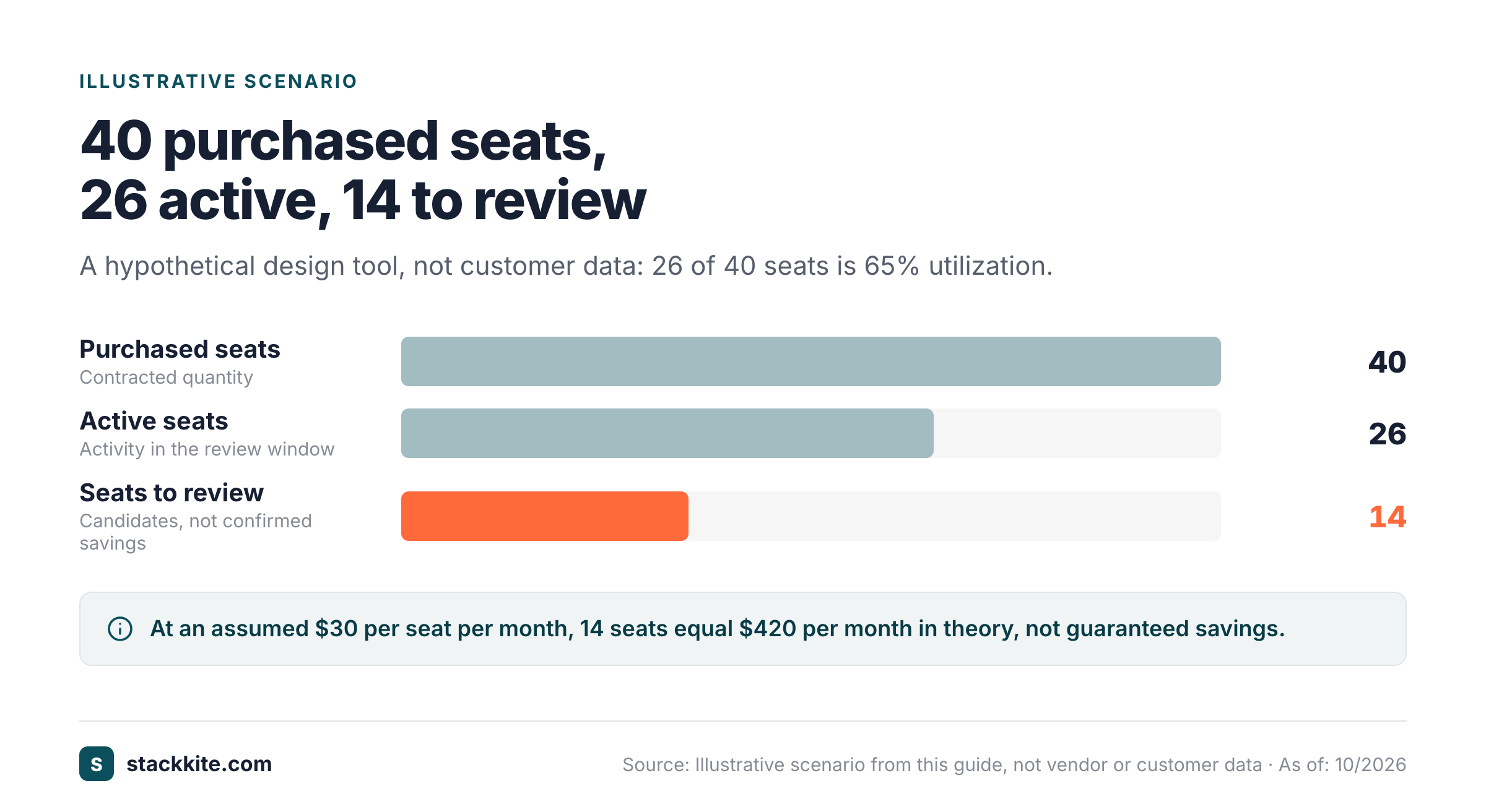
The calculation isn't a forecast until finance checks the contract. It doesn't prove that the vendor will refund prepaid seats, and it can't tell whether a license supports a critical workflow. It's a prioritization signal, not an invoice adjustment.
The calculation changes when the contract bundles seats, enforces a minimum or charges for consumption instead of named users. A usage-based tool may have no meaningful seat denominator. A shared-account product may require a different control. Don't force every subscription into a seat utilization formula merely to fill a dashboard.
Activity evidence has its own limits. An identity provider can show that someone signed in, but not whether the user completed useful work. A vendor may report last login while another reports feature activity. Microsoft Entra's license usage insights, for example, use a representative feature metric for a given license tier. That view doesn't measure every possible task the person might perform.
The measurement window should follow the job. Daily communication tools and monthly accounting tools shouldn't use the same inactivity threshold. Document the threshold and the exception owner. If you can't obtain vendor usage data, mark activity as unknown. Purchased minus assigned seats can still show unallocated capacity, but it isn't a substitute for usage.
What is the best license reclamation workflow?
A reliable license reclamation workflow combines a usage flag, manager confirmation, safe access removal and a documented commercial outcome. IT should own the technical change, but the department owner should decide whether the user still needs the application. Finance then checks whether the action affects the bill.
An administrator shouldn't have to guess whether a seat is safe to remove. If the manager hasn't confirmed the decision, the queue isn't ready for execution.
Start with an exception-aware queue rather than a bulk deletion. The queue should show the application, user or role, last relevant activity, business owner, proposed action and deadline. Put sensitive or privileged accounts in a separate review path. A license with administrative rights isn't a routine cost optimization candidate.
Ask the owner for a decision that can be recorded: keep, reassign, downgrade or remove. Include a reason and the expected business impact. A silent approval by timeout is a poor choice for tools that store customer records or control critical processes. It's better to leave a questionable seat for another review than to break a necessary workflow.
When access must change, follow the vendor's procedure. Microsoft documents both direct and group-based license assignment in its admin center. Its group guidance advises adding the destination group and confirming the new license before removing the old group to avoid a temporary loss of access. That order matters for a role change as much as it does for cost.
Reclaiming a seat doesn't always mean removing the user from the application. A downgrade may preserve access while changing premium features. A reassignment may fill an open request without buying another license. A cancellation may require export, retention checks and an approved offboarding plan. The right action depends on the job and the contract.
After the change, verify that the administrator's assignment list reflects it. Then update the inventory and attach the evidence. If the license can be reduced commercially, ask finance to verify the next invoice or vendor confirmation. Until that happens, label the benefit as potential avoidance rather than realized savings.
How do license tiers change SaaS costs?
SaaS license tiers change cost when users receive premium entitlements they don't need or when essential controls require an expensive plan. The correct comparison is not the cheapest advertised seat. It's the lowest permitted tier that supports the person's actual work and the organization's security requirements.
A design team might need a few advanced creators and many reviewers. A sales organization might reserve expensive reporting or automation permissions for a smaller group. Before changing tiers, list the capabilities that would disappear and get sign-off from the people who rely on them.
A downgrade doesn't help if the replacement plan lacks a required control. It won't be a sensible saving when the team must buy another tool to restore that capability. That's why tier changes need an explicit feature comparison, not only a lower number.
A cheaper plan can create a larger operational problem if it removes single sign-on, audit logs or needed data exports. The security and compliance owner should approve any downgrade that changes identity controls or evidence retention. A monthly license reduction shouldn't quietly increase the organization's access risk.
Review the billing model too. Some products charge by named user, some by active user, some by workspace and others by events or usage. A vendor may have a seat minimum or a fixed annual commitment. A per-user comparison isn't valid for a flat workspace fee. Put the actual billing unit next to every rate in the ledger.
Contractually, distinguish between lowering assigned entitlements and lowering purchased quantity. The former is often an administrator task. The latter may require a commercial amendment, a renewal notice or an authorized buyer. Don't tell the CFO that a downgrade saved money until both sides agree on the billing consequence.
When should I review licenses before renewal?
Review SaaS licenses before the earliest contractual notice deadline, with enough time to gather activity evidence, consult owners and negotiate changes. A renewal date isn't always the last day to act. The notice clause, not the calendar reminder alone, determines whether a reduction is timely.
Start the review while there is still room to change the order. Ask procurement for the executed agreement, renewal term, notice period, minimum quantity and rules for reducing seats. If the contract is missing, request it from the vendor before you forecast savings. The invoice may show a price, but it usually doesn't tell the full cancellation story.
Run the usage review, then prepare a proposed quantity with evidence. Separate seats that were never assigned from seats that were assigned but unused and from seats the business wants to keep as a reserve. Those groups have different levels of confidence. Finance can turn them into a conservative request rather than an inflated savings forecast.
Once a notice deadline has passed, the renewal is no longer a routine date because the quantity is effectively locked in. You can't rely on a verbal promise to change the committed quantity. The finance forecast shouldn't assume a discount that the signed order doesn't contain.
The vendor conversation should be about the quantity and terms that will be accepted. Ask for a revised order form, not only an email saying the account manager agrees in principle. Confirm the effective date, billing period and any minimum commitment. If the vendor won't reduce the contract, document that result and consider redeploying available seats to avoid incremental purchases.
A renewal decision also needs a named approver. The application owner confirms business impact. IT confirms the access plan. Finance approves the budget. Procurement or legal checks the contract. That sequence is easier to repeat when the evidence sits in one record rather than several email threads.
How should SaaS license management work with employee offboarding?
SaaS license management should follow employee offboarding without treating it as a purely financial event. Removing access is a security action first. Reclaiming or reducing the paid entitlement is a separate budget action that follows the vendor's data and billing rules.
IT should use the approved offboarding process to disable access and preserve any required business data. The application owner decides whether files, workflows or ownership need transfer. Finance checks whether the vacated seat can be reassigned, downgraded or reduced. If those steps aren't coordinated, the company may keep paying for an account that nobody can use.
Group-based entitlements deserve particular care. Microsoft notes that the order of moving a user between licensed groups can cause a temporary loss of access. That's a reminder to test dependencies before changing entitlements for active employees. Offboarding is different because access should end, but retention and ownership still need deliberate handling.
Offboarding isn't finished when a login stops working. Someone still needs to confirm the application's records, the license's commercial status and any transfer of business ownership. If those checks don't happen, the next review starts with the same uncertainty.
Don't confuse an identity provider's list with a complete purchasing ledger. A department may buy a tool directly, and an account might not use corporate SSO. Compare finance vendors with the application inventory to find gaps. The same reconciliation supports security because an unknown paid tool may also have unknown administrators.
Which SaaS license management KPIs are useful?
Useful SaaS license management KPIs connect entitlement data to a decision the company can make. Start with coverage, assignment, activity, owner confirmation and contract outcome. A large dashboard isn't necessary if nobody can explain how its numbers change spending.
| KPI | Definition | Decision it supports |
|---|---|---|
| Inventory coverage | Paid apps with a verified owner and contract | Which vendors need investigation |
| Assignment rate | Assigned seats divided by purchased seats | Where unallocated capacity may exist |
| Activity rate | Active seats divided by purchased seats | Which licenses deserve review |
| Owner-confirmed reclaimable seats | Seats approved for release or reassignment | Which administrator changes to schedule |
| Contractually reducible seats | Seats the vendor will remove from the commitment | What can change the invoice |
| Realized savings | Confirmed invoice reduction against the prior commitment | What finance can report as achieved |
| Renewal readiness | Contracts with a decision before the notice deadline | Where a missed window could lock in cost |
The difference between potential and realized savings should be explicit in every report. A spreadsheet estimate can help prioritize work, but it's not a cash saving. It may become cost avoidance when a seat is reassigned instead of purchased, or a realized reduction when the next invoice reflects a lower commitment.
A KPI isn't useful if its owner can't reproduce it. Don't report a percentage without the date and definition of the underlying activity. The calculation won't be comparable next month if the measurement rule changes silently.
Track the quality of the evidence as well as the quantity. A utilization percentage from an unknown source isn't decision-grade data. Add the source, extraction date and definition of activity. Recheck a surprising result with the administrator before presenting it as a finding.
What should a SaaS license review checklist include?
A SaaS license review checklist should cover the contract, administrator evidence, business approval, security impact and invoice outcome. Use it as a repeatable control for every important subscription. It should also capture the exception reason when a low-activity license must remain assigned.
- Confirm the application owner and budget owner.
- Attach the current order, invoice and renewal terms.
- Record purchased, assigned and active seats separately.
- Define the activity window and preserve the export date.
- Ask the business owner to approve each proposed change.
- Check role, SSO, data retention and transfer requirements.
- Confirm the vendor's reduction window and effective date.
- Verify the administrator change and the next invoice.
- Record realized savings separately from potential avoidance.
A completed checkbox doesn't prove that the vendor changed a subscription. It can't replace a revised order or an invoice. The reviewer shouldn't mark savings as realized until the commercial evidence is attached.
A checklist is useful only when it creates evidence. For every completed review, store the decision, who approved it and what changed. A skipped step should carry a reason. That record makes the next renewal faster and gives finance a defensible trail if the savings estimate is challenged.
For a fuller process, connect the checklist to the SaaS spend management guide and the SaaS spend audit checklist. License management handles entitlements, while the broader audit also checks duplicate applications, vendors and contract ownership.
What tools help manage SaaS licenses?
SaaS license management tools range from vendor admin consoles to identity systems and spend inventories. The right combination depends on whether the team needs assignment changes, usage evidence, contract reminders or a place to record decisions. No single data source should be assumed to cover all of those jobs.
The vendor's own admin console is the authoritative place to inspect and change its entitlements. Microsoft 365 administrators, for example, can assign and unassign licenses in the admin center. The identity system may show provisioned access across applications, but it might not capture direct purchases or meaningful feature use. Finance systems can show payment, yet they don't establish which user needs a seat.
A SaaS inventory tool is useful for connecting those records.  Zylo and
 Torii are SaaS management products to evaluate if the organization needs broader management capabilities. Compare their current integrations and contract terms directly, since a product listing doesn't prove a tool can reach your tenant.
StackKite is a smaller option for teams that want to maintain the record manually. Its current product page describes CSV import, application owners, purchased and active seats, renewal dates and notice periods. The published Team plan costs $19 per month per workspace. StackKite doesn't automatically discover applications or connect to vendors to collect activity, so the owner must bring usage evidence from elsewhere.
A tool can't make the business decision for its owner. It shouldn't quietly deprovision a colleague just because a usage metric looks low. A smaller team doesn't need an elaborate platform if it can keep the evidence and deadlines reliable.
The purchasing decision is straightforward. Choose a lightweight inventory when the main pain is scattered contracts and deadlines. Choose a more connected management platform when gathering usage across many vendors is the bottleneck, but confirm exactly which sources it can access. Neither choice removes the need for an owner to approve a risky access change.
Frequently asked questions about SaaS license management
SaaS license management is most effective when teams distinguish access, usage and commercial commitments. These answers cover common edge cases that cause inaccurate savings reports or avoidable access problems.
What is the difference between SaaS license management and SaaS spend management?
SaaS license management focuses on entitlements, seat assignments, utilization and license terms. SaaS spend management covers the wider portfolio of application costs, budgets and renewals.
Can I cancel an unused SaaS license immediately?
An unused SaaS license can be reclaimed operationally, but cancellation depends on the contract. Check the vendor's reduction window and minimum commitment before forecasting savings.
How do I calculate SaaS license utilization?
SaaS license utilization is relevant active seats divided by purchased seats over a defined period. Record the activity definition and review exceptions before acting.
Does removing a user automatically reduce my bill?
Removing a user doesn't necessarily reduce the bill. The subscription quantity and billing commitment may remain unchanged until a permitted contract change.
Can a spreadsheet manage SaaS licenses?
A spreadsheet can manage SaaS licenses when it includes owners, evidence dates, entitlements and renewal decisions. It won't discover apps or collect usage automatically without separate data sources.
The operating principle is consistent: evidence first, owner approval second and commercial confirmation last. That sequence protects access while giving finance a reliable picture of which software costs can change.