SaaS inventory management means keeping one reliable record of the cloud applications your business uses, who owns them, who can access them, what they cost, and when they need review. Start with payment records and identity-system app lists, reconcile the results with department owners, and maintain the inventory whenever a tool is purchased, changed, or retired. You don't need perfect automation to make the first version useful. You do need clear evidence, ownership, and a routine for fixing missing information.
A finance spreadsheet can show which vendors received money, but it doesn't show every application employees use. An identity dashboard can show connected apps, but it doesn't prove which contracts the company pays for. A useful inventory combines both views and records what remains unknown. That's what sets it apart from a simple subscription list, a one-time audit, or an app marketplace.
- Keep one record per application with a business owner, access owner, status, evidence source, cost, renewal date and last verification date.
- Combine finance records, identity-provider app lists, approved integrations and department review, because no single source shows every app.
- Record conflicting values with their source and observation period instead of forcing one number.
- Measure ownership coverage, record completeness and evidence freshness, and review the inventory at least twice a year.
- Turn the list into decisions: notice deadlines, seat reviews and access checks.
Here's how to build the register, handle conflicting records, calculate coverage, and turn the list into decisions. It's written for operations, finance, and IT teams that need a practical system rather than an enterprise rollout plan.
What counts as a SaaS application in the inventory?
Include cloud software that employees use to do business, whether it was purchased by IT, approved by a department, obtained through a free plan, or added during a trial. A free design tool with access to company files belongs in the access inventory even when it doesn't appear on an expense report. A paid application that nobody's logged into lately belongs in the financial inventory until its contract is closed. Both cases matter, but they matter for different reasons, and that's why one record needs both views.
Define a boundary before collecting names. For most small businesses, the first scope is employee-facing SaaS, including CRM, collaboration, marketing, accounting, support, security, and AI applications. You can track infrastructure subscriptions and custom internal applications separately if the same owner or cost model doesn't fit. A vendor may supply several applications under one contract, so one invoice isn't always one app. Don't count them as one. Conversely, one app can have two billing accounts owned by different departments.
Treat an application as the stable record, because that's what lasts when contracts change, and attach its contracts, workspaces, accounts, and integrations as related details. That avoids counting a marketing team's second workspace as a completely new vendor while still revealing the extra license or data-access surface. If a product changes its name, retain an alias and its historical vendor identifier. Otherwise, last year's payment and this month's sign-in report may look like different tools.
The National Institute of Standards and Technology's Cybersecurity Framework 2.0 identifies inventories of software, services, and systems as an asset-management outcome. It also calls for an inventory of services provided by suppliers. That's a good reason to include both paid and unpaid cloud services, but it doesn't dictate one particular spreadsheet layout or vendor product.
A working inclusion rule: record an app when the business pays for it, employees authenticate to it for work, or it processes company data. Tag the reason as paid, access, data, or a combination. That simple tag tells the next reviewer why a record exists, so they won't need to ask.
| Item | Include? | Why |
|---|---|---|
| Paid CRM with 20 seats | Yes | Contract, cost, access and renewal |
| Free AI assistant used with company documents | Yes | Data access and ownership |
| Unused app with an active annual contract | Yes | Financial obligation persists |
| Second workspace under the same app | Link to app | Separate cost or permissions may matter |
| Personal streaming subscription with no business use | No | Outside the defined business scope |
Which fields should a SaaS inventory contain?
The inventory needs enough information to answer four questions without another round of email. It has to say what the app is, who's accountable for it, what access or data risk it creates, and what financial decision comes next. Start with the fields below and expand only when a real review requires more detail.
Identity and scope. Use a canonical application name, vendor name, product URL, category, internal record ID, known aliases, business purpose, department, and lifecycle status. Status values such as approved, trial, under_review, retiring, and retired are more useful than a single yes/no flag. Record the date you first observed the app separately from its purchase date. Those dates can differ.
Ownership and access. Record the business owner who decides whether the app remains useful, the IT or security owner who manages access, the administrator account or group, and the identity provider connection if one exists. Don't store passwords, access tokens, or sensitive authentication details in the inventory. Link to the approved secret-management process instead; that's safer than a copy. Note whether the application has SSO, local accounts, service accounts, and integrations with company data, but mark unverified items as unknown.
Financial and contractual details. Store billing entity, cost center, invoice currency, amount, billing interval, purchased seats, assigned seats, observed active seats, contract start, renewal date, cancellation notice period, and the location of the signed agreement. If an invoice is billed annually, keep the original annual amount. An annualized comparison field can sit beside it, but don't overwrite the actual cash obligation with a normalized estimate.
Evidence and review history. Every important value should have a source and a last-verified date. A paid-seat count from a vendor admin export is stronger evidence than a manager's memory. An invoice is strong evidence of a charge but weak evidence of current activity. Keep a link to the original source in a restricted document store and record who's verified it. Where documents contain employee information, grant access only to people who need it.
The Center for Internet Security's Control 2.1 describes an inventory with software title, publisher, initial installation or use date, and business purpose, with additional details where relevant. It calls for reviewing and updating the software inventory at least twice a year. A business-facing SaaS register can add financial and access fields without becoming a full technical software inventory for endpoint compliance.
SaaS inventory starter template
Copy the fields into a spreadsheet or your inventory tool. The values shown are an example record, not real data.
- app_id
- APP-0042Stable internal ID
- app_name
- Design Suite
- vendor
- Example Vendor
- department
- Marketing
- status
- approvedapproved, trial, under_review, retiring, retired
- discovery_source
- invoice+SSOWhere the app was found
- business_owner
- Marketing Lead
- access_owner
- IT Admin
- billing_owner
- Finance
- currency
- USD
- amount
- 1200
- billing_cycle
- annualmonthly or annual
- purchased_seats
- 10
- active_seats
- 8Observed in a report with a stated window
- renewal_date
- 2027-03-15YYYY-MM-DD
- notice_days
- 30
- contract_location
- Link to the signed order formLink to the restricted document store
- last_verified_at
- 2026-10-30YYYY-MM-DD
- verification_owner
- IT Admin
- notes
- Example data only
How do you discover SaaS apps across the company?
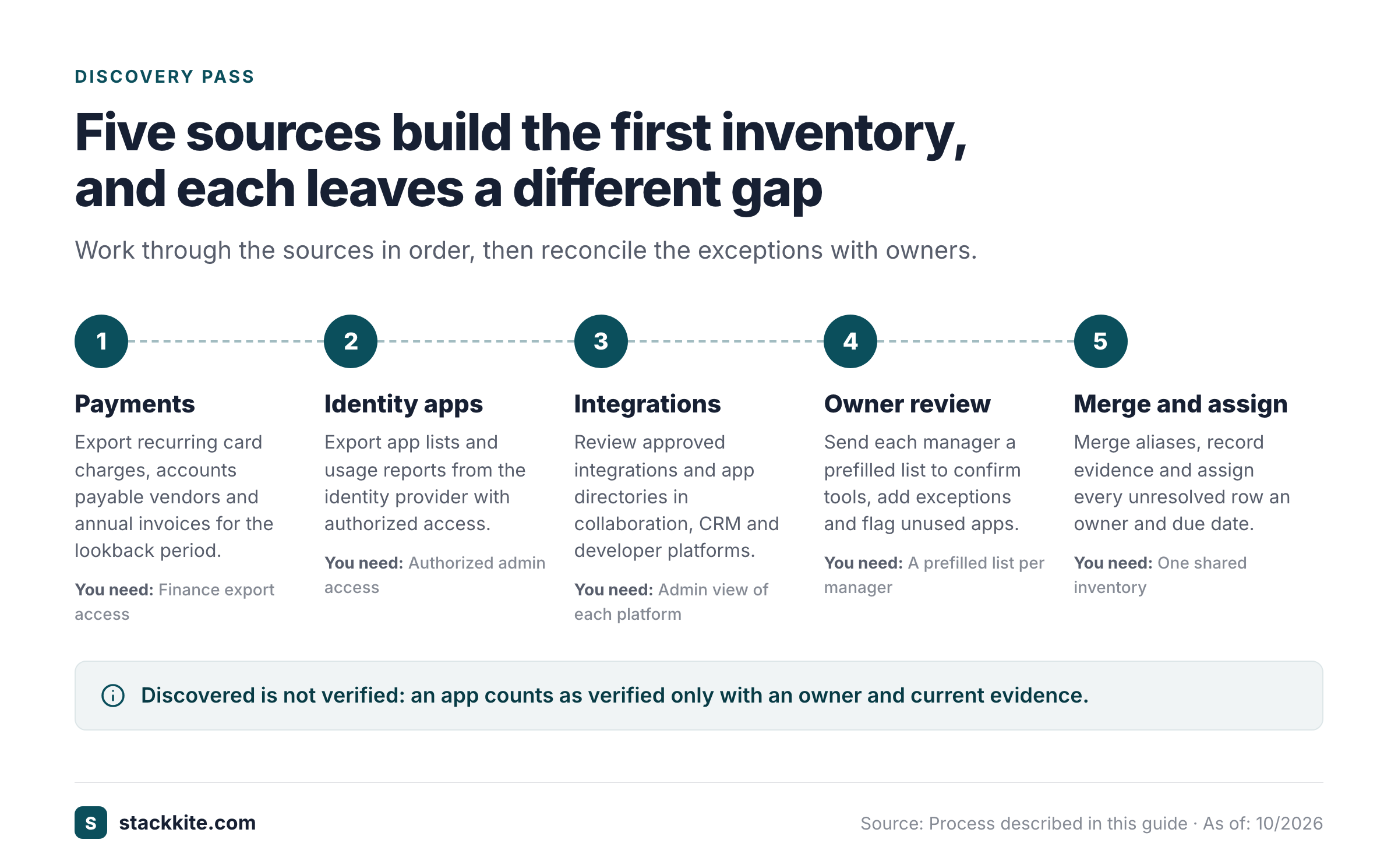
Use several sources because no single source covers every app. Work from sources that already exist before asking every employee to fill out a form. You can finish a good first pass with read-only exports, approved reports, and a short owner review. You won't need new tooling. Keep the source names attached to the records so you can reconcile them later.
1. Start with finance records. Export recurring card charges, accounts payable vendors, reimbursements, and purchase orders for a sensible lookback period. Include annual renewals, not just the last month's charges. Search for vendor aliases, subsidiaries, reseller names, and charges in foreign currencies. An annual subscription purchased eleven months ago will be invisible in a 90-day card export. Ask finance which billing entities and employee cards are in scope. Until then, don't treat the export as complete.
2. Add identity-provider applications. Microsoft Entra ID lists enterprise applications used for identity management, including service principals created through app registrations, consent, or integrations. Its usage and insights reports can show sign-in activity, subject to licensing and permissions. Okta's Application Usage report can show sign-ins to app integrations within its reporting window. These sources reveal managed access. They won't show every standalone password account or purchased contract. Don't label an app unused merely because an identity report has no recent sign-in.
3. Check approved app and integration lists. Review the applications connected to collaboration, CRM, developer, and document platforms where administrators have a legitimate inventory view. A connected app can have access to data even when it doesn't appear as a separate expense. For each integration, record the parent platform and the accountable owner. Don't copy OAuth secrets or private tokens into a general spreadsheet.
4. Ask departments to reconcile the shortlist. Give each manager a prefilled list rather than an open-ended questionnaire. Ask them to identify missing tools, shared accounts, active trials, redundant products, and apps they no longer use. A 15-minute review with a named owner often resolves more ambiguity than a broad survey that nobody's responsible for completing.
5. Compare the sources and create exceptions. An invoice without a known user is a financial exception. An identity-connected app without a business owner is an access exception. An app mentioned by a team without a payment or identity record is an unverified discovery. Assign each exception an owner and a due date, because nobody's going to chase an unowned row. Keep the record in the inventory while it's investigated.
The key distinction is between discovered and verified, and it's easy to blur. A discovered app can be real but incomplete. A verified app has an owner and enough evidence for its current state. Don't inflate coverage by marking every name found in a CSV as fully verified.
How should you reconcile duplicate and conflicting records?
Reconciliation is where an app list becomes a trustworthy inventory, and it's where most teams stall. Start by normalizing vendor names and common aliases. Example CRM, ExampleCRM Inc., and a reseller's invoice description may refer to one product, but don't merge them solely because their strings look similar. Check the vendor domain, invoice number, tenant identifier, contract owner, or an admin screenshot before deciding.
Give each application a stable internal ID. Keep separate contract IDs when the same app has multiple subscriptions. This matters for renewal management: two teams may have different prices and cancellation terms for the same product. A single consolidated row can summarize the app, but the contract records must preserve those differences.
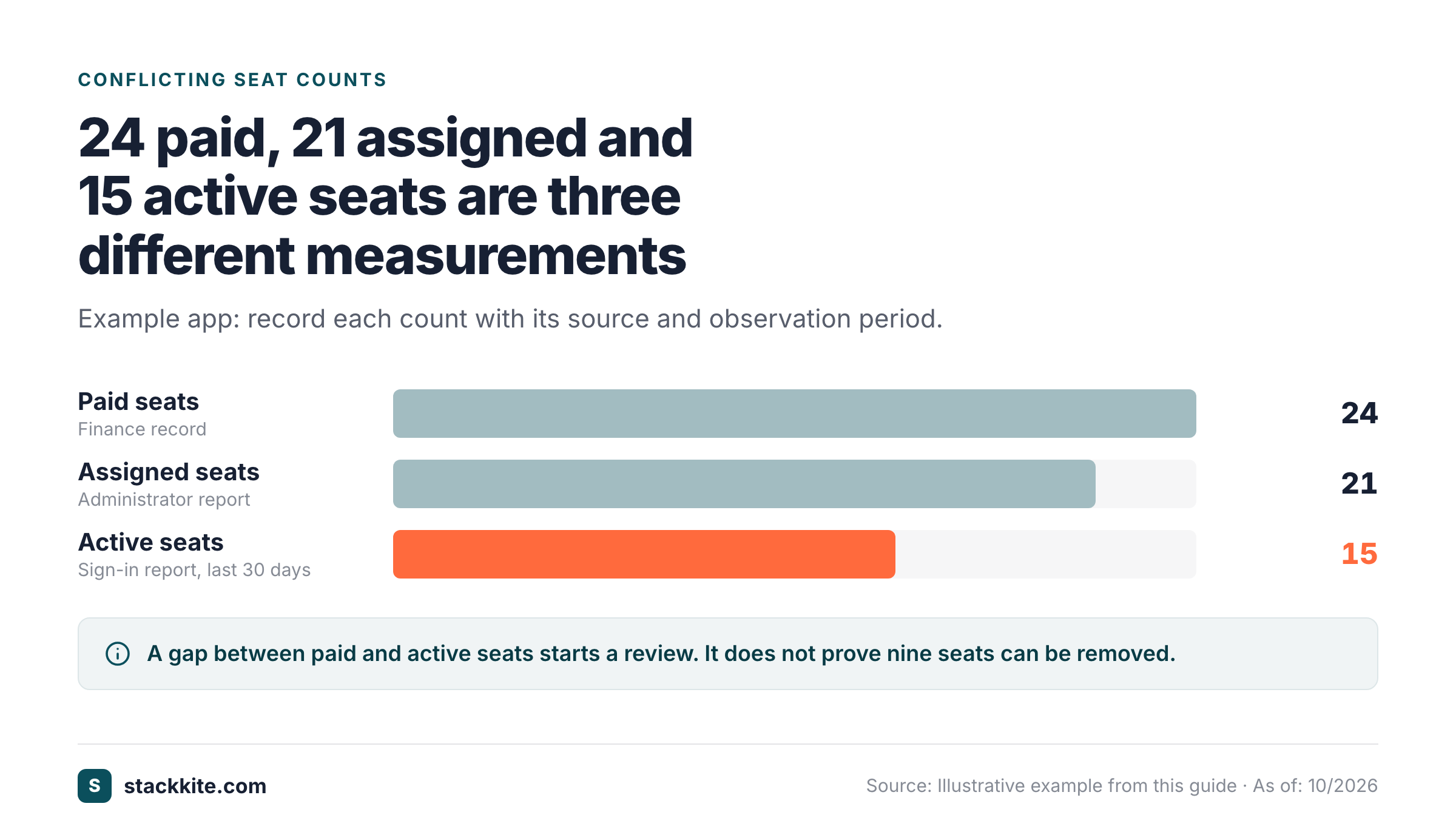
When evidence conflicts, record both values and the reason. Suppose finance shows 24 paid seats, while an administrator reports 21 assigned seats and a sign-in report shows 15 people active during the last 30 days. Those aren't three versions of one metric. They're different measurements. Record each one with its source and observation period. The difference between paid and active seats may suggest a review, but it doesn't prove all nine seats are immediately removable. Shared accounts, seasonal roles, and minimum commitments may change the decision.
Use a simple confidence label with three levels: verified for a value confirmed by an authoritative current source, reported for a value supplied by a named owner, and unknown when no reliable evidence exists. Never invent a price, a seat count, or a renewal date to fill an empty cell. If a contract's missing, make locating it an action item.
A practical exception queue has the application ID, discrepancy, competing sources, assigned reviewer, target date, and resolution note. Review that queue weekly until the initial inventory's stable. Afterward, it can become part of normal purchasing and offboarding routines.
This table shows which source to prefer for each field.
| Question | Prefer |
|---|---|
| Billed amount | Current invoice or signed order |
| Purchased seats | Contract or vendor billing console |
| Assigned seats | Vendor administration export |
| Actual activity | Report with a defined observation window |
| Business purpose | Accountable department owner |
Keep all conflicting evidence until the difference is resolved.
How do you measure SaaS inventory coverage and data quality?
A count of apps isn't enough. A company can have a list of 80 names with no owners, while another has 45 fully reviewed records that support real decisions. Use a small set of operational measures, and label denominators so the figures can't be mistaken for independent benchmarks.
Record completeness measures how many discovered records have the required fields. Define the required fields before calculating it. For example, if your minimum is application name, owner, status, discovery source, and last verification date, an entry missing any one of those is incomplete. Divide complete records by all discovered in-scope records. This measures record quality, not the percentage of all software in existence, because undiscovered apps are outside the denominator.
Ownership coverage measures records with a confirmed business owner divided by all in-scope records. Evidence freshness measures records verified within your chosen window divided by all in-scope records. Choose a tighter window for high-risk apps and renewals, and treat it as your own target, not a compliance requirement. CIS Control 2.1 gives a broader baseline of at least twice-yearly review for the software inventory.
Renewal readiness measures active paid contracts with a known renewal date, notice period, and owner. A renewal date without a notice deadline may still leave the company unable to act in time, and that's a common gap. Access exception rate measures active apps without a confirmed access owner or without a known authorization state. Keep it separate from finance completeness so a well-documented invoice doesn't hide an access gap.
Here's a deliberately hypothetical example. A team discovers 60 in-scope apps, confirms business owners for 48, and verifies the five required fields for 42. Ownership coverage is 48 / 60 = 80%. Record completeness is 42 / 60 = 70%. Those numbers describe this sample only. They aren't an industry benchmark, and they don't prove that the other apps are harmless or unused.
The formulas below keep the denominators explicit.
| Measure | Formula |
|---|---|
| Ownership coverage | Apps with confirmed business owner / discovered in-scope apps × 100 |
| Record completeness | Apps with all required fields / discovered in-scope apps × 100 |
| Evidence freshness | Records verified within your chosen window / discovered in-scope apps × 100 |
| Renewal readiness | Paid contracts with owner, renewal date and notice deadline / active paid contracts × 100 |
| Access exception rate | Active apps without a confirmed access owner or authorization state / active apps × 100 |
How can you turn the inventory into renewal and access decisions?
Every inventory should produce a short action list. Otherwise, the team has built a catalog that's outdated after the first review. Start with decisions that have deadlines or clear risk: a contract approaching its notice period, a former employee's application access, a trial with broad data permissions, or a paid app with no accountable owner.
For renewals, separate the renewal date from the cancellation notice deadline. A contract that renews on April 30 with a 60-day notice period may require a decision around March 1, depending on the contract's exact wording and calendar rules. Don't assume the last day to act from a generic formula when the agreement has unusual clauses. Store the contractual language and have the contract owner verify the date.
For license reviews, compare purchased, assigned, and active seats. Purchased minus assigned is a possible unused allocation, while assigned minus observed active may point to dormant users. Neither difference is an automatic savings figure, and neither is a reason to cut seats without asking. A seat may be committed for the term, or the application may not expose reliable activity. Ask the business owner whether reassignment, downgrade, or a later renewal adjustment is appropriate. Record the decision and its expected effective date.
For access reviews, start with apps that handle sensitive company data or allow administrative actions. Check the current owner, active administrators, SSO or local login method, and offboarding process. An app with no SSO isn't necessarily unsafe, but it may require an explicit local-account review. A free tool can need more urgent attention than a large paid platform if nobody knows who's granted access.
Keep decisions in the same workflow as the app record. Use keep, consolidate, reduce_seats, renegotiate, cancel, or investigate as suggested actions, with a reviewer and due date. A decision isn't complete until its outcome is recorded. If the team cancels an app, document data export, access removal, contract confirmation, and whether any integrations need replacement.
- Contract owner and decision maker confirmed
- Actual renewal date and notice language checked
- Purchased, assigned and active seats separated
- Business-critical integrations and data export identified
- Security and access exceptions reviewed
- Decision recorded with owner and date
- Cancellation or change confirmation retained
Should you use a spreadsheet or SaaS inventory software?
A spreadsheet is a valid starting point when the app count is modest, owners can maintain it, and access is controlled. It's easy to export, audit, and adapt. Its weakness isn't the format itself. The weakness is that nobody may own updates, formulas may drift, and contract reminders may depend on one person's calendar. If a spreadsheet works, don't replace it merely to add a dashboard.
A dedicated inventory tool becomes useful when the company needs shared ownership, permissioned edits, consistent fields, document history, renewal reminders, or structured exports. More advanced SaaS management platforms may also offer automated discovery from identity, finance, browser, or vendor integrations. Check the exact integration coverage and access permissions, because that's where vendors differ. A vendor's phrase "automated discovery" doesn't guarantee that every shadow app or standalone account is found.
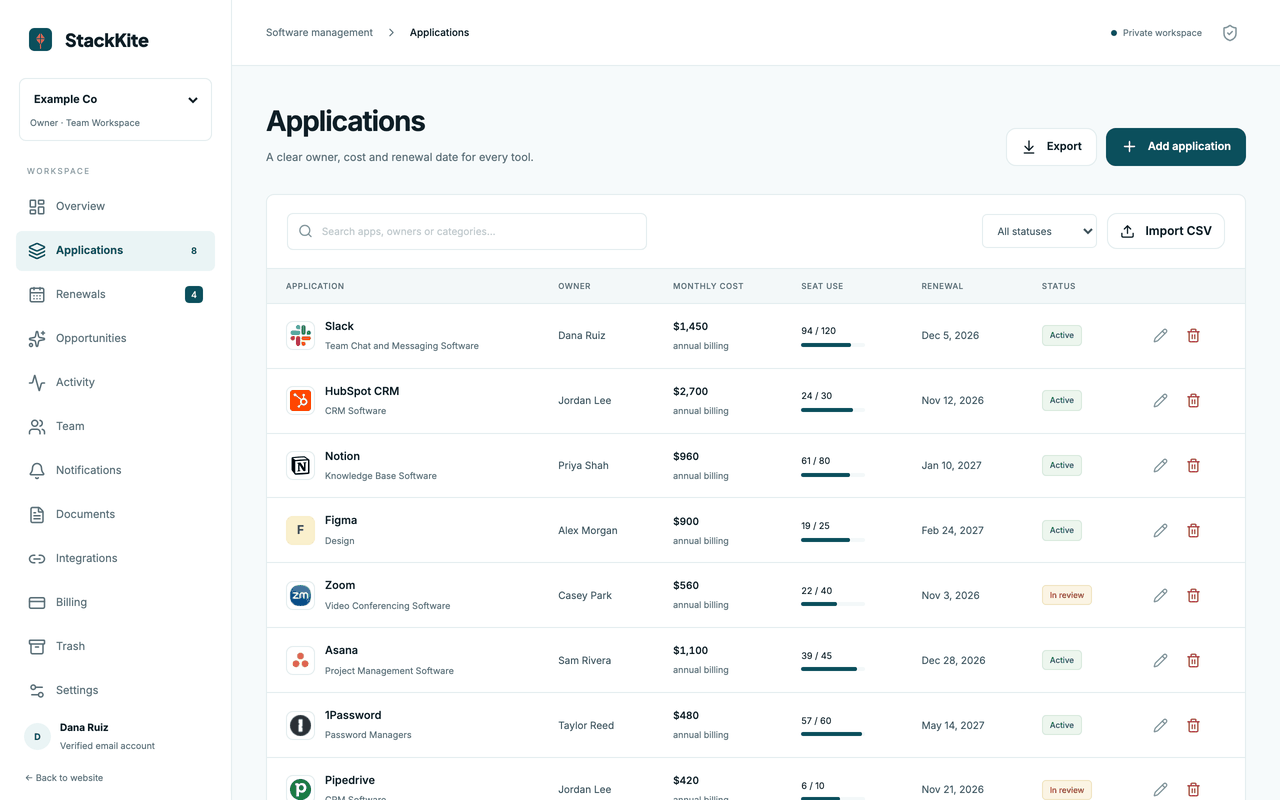
For a focused small-team option, StackKite's inventory features include manual entry, CSV import and export, owner and cost fields, seat review, renewal dates, notice periods, and read-only access for AI assistants through MCP. Its pricing page lists one Team plan at $19 per month per workspace, subject to the plan's published limits. StackKite does not automatically discover applications, connect to bank feeds or identity providers, or cancel contracts. That distinction matters: it's a place to manage evidence you collect, not a promise to find all unknown tools for you.
Compare software on the work you actually need. A business with one finance owner and 25 known applications may prefer a well-managed spreadsheet. A company with several departments, inconsistent billing accounts, and frequent offboarding may need stronger access and workflow controls. A large organization with many unmanaged accounts may justify an automated discovery platform, but should test its coverage against known exceptions before signing a long contract.
If you're deciding between approaches, start with the current inventory and one real upcoming renewal. Ask each tool to show the same record, the same ownership handoff, and the same notice-date alert. That demonstration is more useful than a generic feature checklist.
The table below compares the three operating models by fit and limitation.
| Approach | Best fit | Main limitation |
|---|---|---|
| Controlled spreadsheet | Small, stable inventory | Manual reminders and review discipline |
| Focused inventory workspace | Teams sharing records and renewal decisions | Discovery may still be manual |
| Automated SaaS management platform | Many accounts and discovery sources | Integration coverage, implementation and cost vary |
How do you keep the SaaS inventory current?
Assign one inventory steward who owns the process, not every software decision. The steward isn't the approver. The business owner remains accountable for an individual app, and that doesn't change when IT handles the access. Finance validates contracts and charges, and IT's role is access. IT or security validates access. Procurement, if present, coordinates purchase and renewal controls. These responsibilities should be written down so a missing field doesn't sit between departments indefinitely.
Tie updates to events. A new purchase should create or update a record before access is widely granted. A trial should get an owner and an expiry review. An employee departure should trigger a check of assigned seats and local accounts. A price change should update the contract evidence and annual cost. A cancellation should move the app through retiring to retired after data and access have been handled. A renamed product should update the alias, not erase the history.
Use a cadence that fits the risk. A weekly exception review can resolve missing owners and imminent renewals. A monthly finance reconciliation catches new charges and changed prices. A quarterly business-owner review can confirm purpose and utilization. A twice-yearly full inventory review aligns with the baseline frequency in CIS Control 2.1, but critical systems may need more frequent checks.
Set a minimum evidence standard for each review. An owner reply that says "we still use it" may be sufficient to confirm purpose, but it doesn't verify a seat count or contract term. For those fields, request the right export or document. Mark the last verification date per field or evidence group when possible. If the system only supports one date, document which facts were checked.
Finally, preserve an export route. The company should be able to retrieve its app list, contracts, and decision history if it changes tools. Test that export during onboarding, so you don't find out it fails during a dispute or after a subscription expires. A durable inventory is a business record. It isn't a feature locked inside one vendor's interface.
Use this cadence as a starting point and adjust it to your risk.
| When | What to do |
|---|---|
| Every new purchase | create or update the app and assign an owner. |
| Weekly | resolve discovery and ownership exceptions. |
| Monthly | reconcile new charges and check upcoming notice deadlines. |
| Quarterly | ask owners to confirm purpose, access and seat use. |
| At least twice yearly | review the full software inventory and record the review date. |
| On retirement | export needed data, remove access, document the contract outcome. |
What are the most common SaaS inventory mistakes?
Counting only paid apps. Free trials and no-cost tools may still process business data. They need ownership and access review even if their financial amount is zero. Keep a separate no charge observed state. Don't assume free forever from the absence of an invoice.
Treating a sign-in report as the complete app universe. Identity-provider reports only cover activity visible to that system and its licensing or reporting limits. Local-account applications and employee-paid tools can be absent. Cross-check identity data against finance and department records.
Merging contracts too aggressively. One vendor can bill several business units with different terms. A consolidated app row is useful for visibility, but contract-level dates and obligations must remain separate.
Confusing assigned seats with active use. An assigned seat may not have recent observed activity. Activity reports can be incomplete, and seat reductions may be restricted by contract. Use the gap to start a review. It's not a guaranteed savings estimate.
Missing notice deadlines. A renewal date alone doesn't tell the company when it must decide. Record the notice period and contract-specific deadline together, and verify them against the agreement.
Inventing values to make the dashboard complete. An unknown renewal date is an operational problem. A guessed renewal date is a misleading control. Keep unknowns visible and put them in an exception queue. That's the honest way to run it.
Buying automation before defining ownership. Automated imports can create hundreds of names without a responsible decision maker. First define the fields, owners, lifecycle statuses, and exception process. Then use automation to cut repetitive work.
Frequently asked questions
What's the difference between SaaS inventory management and SaaS spend tracking?
SaaS inventory management identifies applications, owners, access, evidence and lifecycle status. SaaS spend tracking focuses on reconciling charges, normalizing recurring costs, and monitoring financial changes. A trustworthy inventory supports spend tracking, but a payment ledger alone can't prove which applications people access.
Does a SaaS inventory need to include free software?
Yes, when the application is used for business or can access company data. Record the purpose, owner and access scope even if no invoice exists. A zero observed charge doesn't prove that the tool has no security or contractual implications.
How often should a SaaS inventory be reviewed?
CIS Control 2.1 calls for a software inventory review at least twice a year. Many teams also reconcile new payments monthly and review exceptions more often. Choose additional checks according to the application's risk, renewal dates and rate of change.
Can identity-provider data find every shadow IT application?
No. It shows applications and activity visible to that identity system. It doesn't necessarily show standalone accounts or all purchases. Combine identity, finance, integration and department evidence, then label unknown coverage honestly.
What should I do if an app has no owner?
Keep the record and flag it as an exception. Don't delete it. Ask the department that uses it, the billing owner, and the identity administrator to identify a decision maker. Until ownership is confirmed, avoid treating the app as approved merely because a charge exists.
How do I avoid counting the same app twice?
Use a stable application ID, known vendor aliases and separate contract records. Merge only after checking domains, tenant or contract identifiers, and ownership. Preserve multiple contracts when their terms differ.
The next step
Start with the applications you can prove exist, then make the missing ones visible. A reliable inventory isn't the longest list. It's a record that lets someone answer who owns an app, what evidence supports its status, and what decision comes next. Use the SaaS spend management guide for the broader cost process and the SaaS spend audit checklist for a structured review. If your team needs a shared register rather than another spreadsheet, see how StackKite works and verify that its manual-import model fits your discovery process.