A SaaS spend audit checklist helps finance and IT find every paid application, reconcile the bills, check unused licenses and decide what to do before renewal. The audit isn't a hunt for the cheapest tools. It's a repeatable review that connects each subscription to an owner, evidence of use, a contract and a decision.
Start with payments and invoices, not with a list of applications somebody remembers. Then match each vendor to an account owner, a subscription plan and a renewal date. Don't cancel a product merely because the dashboard looks quiet. Check who relies on it, whether the contract allows a reduction and what would break if access disappeared.
You'll find a working checklist here, with a reusable spreadsheet structure, an evidence standard and a decision log. It's intentionally narrower than SaaS spend management, which covers the ongoing operating model, and SaaS spend optimization, which covers the wider savings program.
- A reconciled application inventory with an owner and actual spend for each subscription.
- Purchased seats, active seats and the evidence date, with gaps marked unknown.
- Renewal and cancellation notice dates checked against contract language.
- A keep, reduce, consolidate, renegotiate or retire decision with an approver and next action.
- An audit trail that distinguishes estimated savings from savings already realized.
What does a SaaS spend audit cover?
A SaaS spend audit covers recurring software payments, contract commitments, access and utilization, ownership, duplicate capabilities and renewal exposure. It doesn't end when a spreadsheet lists vendors, and it isn't finished until every line has an owner. Finance can't approve a reliable spend figure without reconciliation, IT can't ignore operational dependencies and the business owner can't skip a decision.
An internal software audit also has a security purpose. The US National Institute of Standards and Technology explains that accurate software inventories support license compliance and help organizations avoid unnecessary licenses. NIST's software inventory guidance is broader than SaaS, but the principle applies to subscription records: an unknown application is hard to budget or govern.
A useful audit asks three different questions. Invoices and expense records show what the company pays for. Admin consoles and business owners show what it uses. Contracts, notice deadlines and operational impact show what it can change. Don't treat those answers as interchangeable.
| Audit evidence | Primary owner | What it proves | Common blind spot |
|---|---|---|---|
| Accounts payable and card transactions | Finance | Actual charges and payment timing | Annual invoices outside card feeds |
| Vendor agreement and order form | Procurement or legal | Term, renewal and notice conditions | A verbal promise isn't a contract change |
| Admin license export | IT or app owner | Purchased and assigned licenses | Assignment isn't proof of activity |
| Usage report and team confirmation | Application owner | Active use and business dependency | A service account may be critical but rarely log in |
| Decision and approval record | Budget owner | Authorized next action | Expected savings aren't yet realized |
How do I run the SaaS spend audit checklist?
Run the SaaS spend audit checklist in a fixed sequence of seven steps: set the boundary, build the inventory, reconcile contracts, review seats, check overlap, audit renewals and record decisions. Each step should produce a named artifact, not just a conversation. You don't need an enterprise platform to complete the steps below with a spreadsheet, while larger teams may use software management systems.
Set the audit boundary
List every recurring software charge in scope, including cards, reimbursements and AI subscriptions. Fix the reporting period and currency, and record the date of the inventory refresh.
Build the inventory
Export accounts payable, card and expense transactions. Group recurring software merchants, add known subscriptions that aren't visible there, and give each one an ID and an owner.
Reconcile contracts and invoices
Attach the latest invoice, legal vendor, plan and billing cycle. Compare the charge with the signed order form before you estimate any savings.
Review paid seats
Record purchased, assigned and active seats with a source date. Ask the owner to confirm shared, service and seasonal accounts before proposing removal.
Check overlap
Map which products do the same job, who uses them and what switching would cost. Compare total contract cost, not list prices.
Audit renewals
Read the executed contract and amendments. Capture the renewal date, notice deadline, minimum commitment and the person who can contact the vendor.
Record decisions
Choose keep, reduce, consolidate, renegotiate or retire. Add the evidence, approver, deadline and expected financial effect, and label estimates as estimates.
Step 1: Set the audit boundary
The audit boundary should include every recurring software service paid by the company, not only applications that IT approved. Include direct invoices, employee reimbursements, departmental cards, marketplace subscriptions and AI subscriptions. A free tool belongs in the access inventory when it holds company data, but it shouldn't count as paid spend when no charge exists.
Pick one reporting currency for the internal budget, but don't lose the vendor's original invoice currency. When a bill is in another currency, record the actual ledger conversion separately with its accounting date and source. The invoice remains the source of truth for the vendor amount, not the vendor's public list price.
Choose a consistent period for the audit. A trailing twelve-month view can expose annual charges that disappear from a single month's transactions. A point-in-time view is still useful for active subscriptions, but it won't reveal the full payment history. Record both the reporting period and the date the inventory was refreshed.
Step 2: Build one vendor and subscription inventory
The inventory needs a record for each contract or paid subscription, even when one vendor has several products. Don't collapse a CRM, a marketing module and a support module into a single line if they have different renewal dates or license rights. Group them under a common vendor only for reporting; that's the one place a single total helps. Otherwise different contract deadlines end up hidden in one total.
Finance should compare card merchants, accounts payable vendors and reimbursement descriptions. Merchant names don't always match product names. A charge under a parent company might belong to a different product, while a reseller invoice may cover several vendors. Keep the invoice and the account identifier attached to the record, and don't guess from a card descriptor.
Identity-provider app listings and admin-console exports can reveal subscriptions that finance didn't recognize. Identity-provider data is evidence of an integration, but it isn't proof of payment or actual use. Ask department leads about tools they've bought outside central procurement. Zylo's SaaS audit guidance explicitly recommends reviewing applications acquired through expense or credit card channels, so a payment-only export is a starting point rather than a complete inventory.
Step 3: Reconcile what the contract says with what the company pays
A contract reconciliation compares the signed commercial terms with the actual bill. Check the legal vendor, subscription term, billing cadence, committed seats, unit price, add-ons, tax treatment and credits. An invoice can be correct for the contract yet still represent a poor buying decision. Keep those questions separate. Reconciling the invoice won't fix an unnecessary contract.
When a contract lists annual value but invoices monthly, compare the annual commitment with the sum of expected payments. When it lists usage-based charges, capture the measurement unit and the billed usage rather than forcing the product into a seat-price column.
Save the exact contract clause or amendment that supports each notice date. A calendar reminder without the source clause isn't sufficient evidence. It doesn't show whether an amendment changed the deadline. If the agreement is missing, mark the notice deadline as unknown and escalate to procurement or legal.
Step 4: Review paid seats and meaningful utilization
A seat audit separates purchased, assigned and active licenses. Purchased seats are the billable entitlement. Assigned seats show who has access. Active seats need a definition from the product's usage report, such as activity in the agreed review window. Those three numbers often differ, but a difference alone doesn't prove a license can be removed.
Ask the app owner to check departing employees, duplicate identities, contractor accounts and service accounts. Some accounts are required for integrations, legal retention or seasonal work. Don't delete a shared account merely because it doesn't look like an active human user. Require the owner to confirm the dependency and the replacement plan.
A fictional example shows the arithmetic. It isn't a benchmark for what any vendor charges. A team buys 40 seats at an illustrative $25 per seat each month and verifies that 28 are needed. The 12-seat difference represents $300 of monthly theoretical exposure, or $3,600 annually, before contract limits. The realized saving is $0 until the vendor accepts a reduction and the billing changes.
| Illustrative audit item | Seats | Unit price (USD per seat per month) | Monthly exposure (USD) |
|---|---|---|---|
| Purchased licenses | 40 | $25 | $1,000 |
| Confirmed needed licenses | 28 | $25 | $700 |
| Potentially removable licenses | 12 | $25 | $300 |
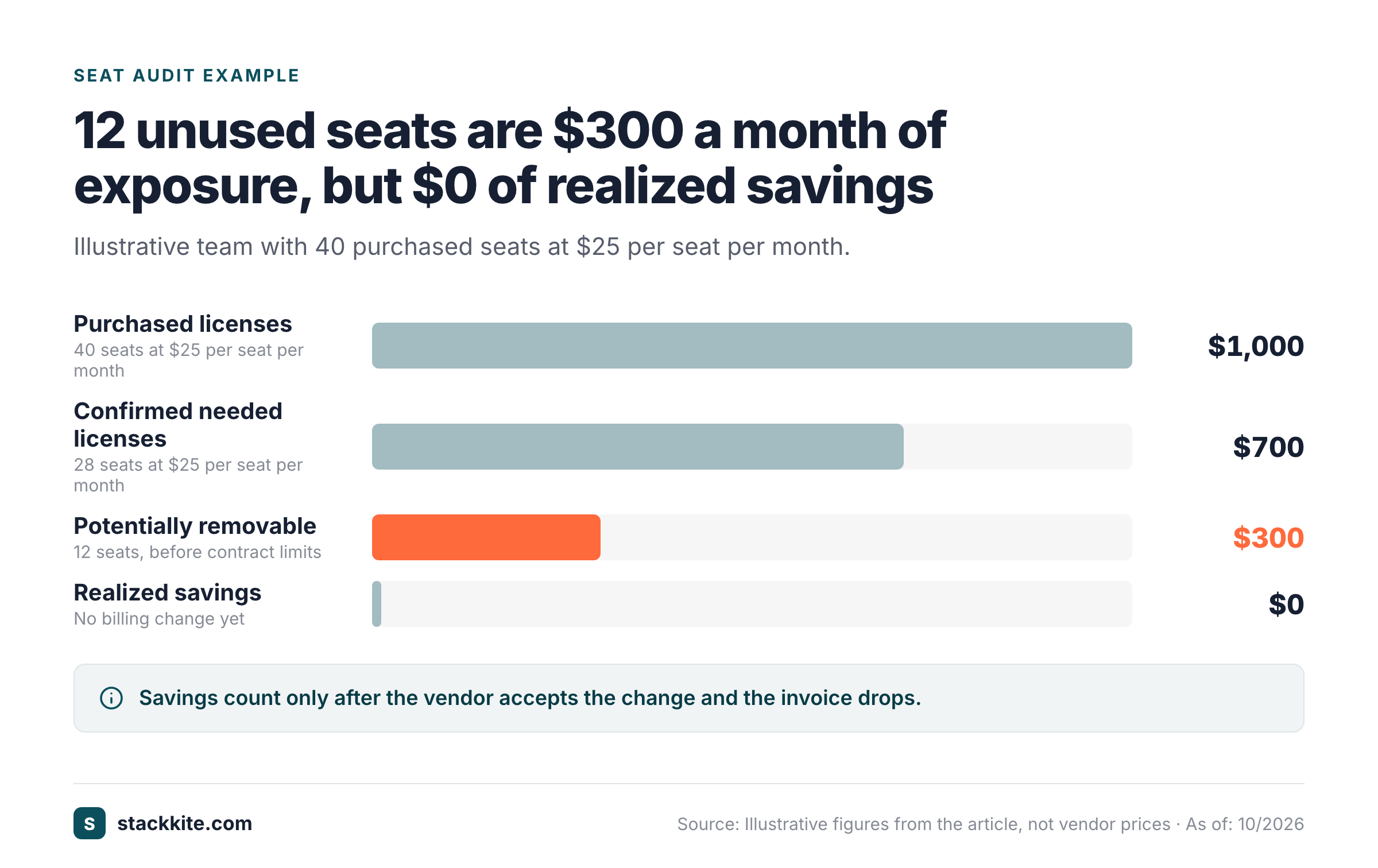
Potential and realized savings need separate lines. If the order form has a minimum seat count, the contract may prevent an immediate reduction. Put the earliest permitted change date beside the exposure amount so finance doesn't book a saving too early.
Step 5: Review duplicate capabilities without disrupting work
Duplicate capabilities are products that appear to solve the same business problem. Two meeting schedulers or two survey platforms may overlap, but a comparison by category name alone isn't enough. Ask each owner which workflows, integrations and customer-facing dependencies are unique. Don't assume two similar labels mean interchangeable tools.
Create a capability map that names the job, the current users, the data held in the product and the switching cost. Compare the total contract cost of the alternatives, not just the list price. A migration that consumes weeks of staff time may erase a small subscription saving, while a duplicate whose contract is about to end and that no workflow depends on may be easy to retire.
Before approving a consolidation, review access, retention and export requirements for both products. A cheaper tool isn't a viable replacement when it can't meet the team's legal or operational requirements.
Step 6: Audit renewals and notice deadlines
Renewal risk is the gap between the date a contract renews and the last date the company can act. Record the signed notice period, the calculated notice deadline, the renewal owner and the action channel required by the agreement. Don't confuse the renewal date with the last day to give notice. A reminder should be scheduled before the notice deadline, not only before the renewal date.
A renewal queue should sort by the earliest actionable deadline, then by financial exposure and operational complexity. Large contracts usually need security, legal and budget review, and they'll take longer than anyone plans for. Small monthly subscriptions are still worth reviewing, but they shouldn't displace an imminent high-value contract decision.
Capture the current contract version, not an old PDF from the original purchase. An outdated PDF isn't enough to support a cancellation decision. Amendments can change seats, term, discount or renewal mechanics. If the latest signed version is missing, mark the renewal review blocked and assign someone to retrieve it. That's a real evidence gap, not a reason to invent terms.
Step 7: Approve actions and track actual results
An audit decision is complete only when a named owner accepts the action, the approver signs off and the next event has a date. Choose keep, reduce, consolidate, renegotiate or retire. Include a short explanation of why the product still matters or why a change is safe. Nobody should approve a retirement without a business owner.
Use separate fields for estimated annual exposure, contracted savings and realized savings. Estimated exposure is a scenario, and it's not a saving. Contracted savings need a confirmed amendment or new order that's been signed. Realized savings requires evidence that the invoice or payment changed. Finance should be able to trace every saving it reports to a vendor document or ledger line. An unaccepted proposal isn't cash saved.
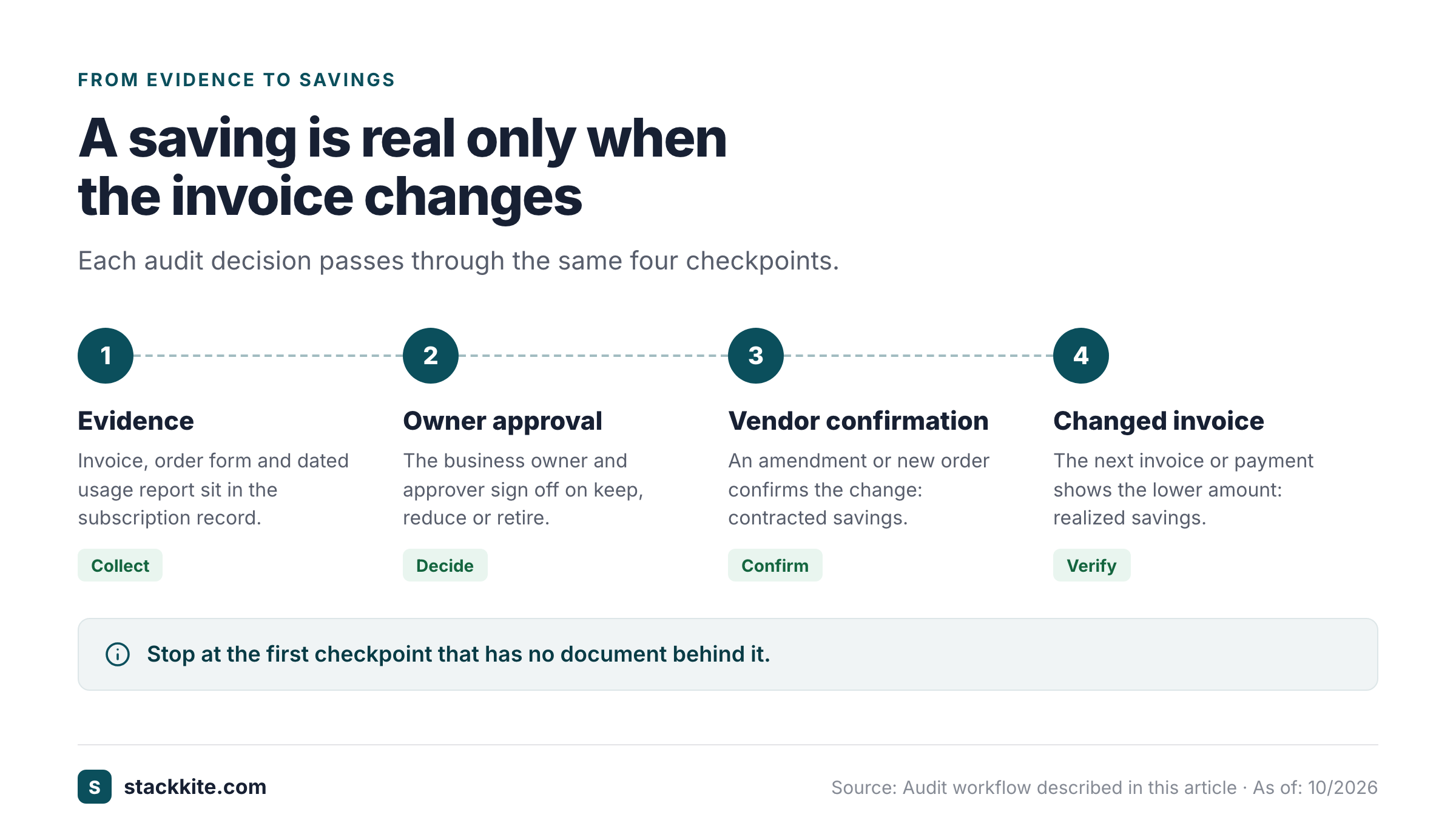
Keep the decisions attached to the subscription record. A future owner who's inheriting it needs to know why a contract was renewed despite low utilization, why a service account stayed active or why an apparently redundant tool couldn't be retired. Don't replace that history with a single green status label.
Which fields belong in a SaaS spend audit worksheet?
A SaaS spend audit worksheet needs subscription identity, payment evidence, license evidence, renewal terms, decision ownership and a savings trail. The template below is split into four sections that share the Subscription ID, so each row stays one subscription.
SaaS Spend Audit Worksheet
One row per subscription, four sections. The rows are fictional examples; replace them with your own records and write Unknown wherever evidence is still missing.
| Subscription ID | Product | Business owner | Invoice reference | Billing currency | Recurring charge | Billing cycle |
|---|---|---|---|---|---|---|
| SAAS-001 | Example design suite | Marketing lead | INV-EXAMPLE-1 | USD | 1000 | Monthly |
| SAAS-002 | Example CRM | Sales operations | ORDER-EXAMPLE-2 | USD | 2500 | Annual |
| SAAS-003 | Example survey tool | Customer research | CARD-EXAMPLE-3 | USD | 60 | Monthly |
| Subscription ID | Purchased seats | Active seats | Usage evidence date |
|---|---|---|---|
| SAAS-001 | 40 | 28 | 2026-10-20 |
| SAAS-002 | 25 | Unknown | Unknown |
| SAAS-003 | 6 | 6 | 2026-10-22 |
| Subscription ID | Renewal date | Notice deadline | Decision | Decision approver | Next action date |
|---|---|---|---|---|---|
| SAAS-001 | 2027-03-01 | 2027-01-30 | Reduce | Finance lead | 2026-11-10 |
| SAAS-002 | Unknown | Unknown | Keep | Sales lead | 2026-11-12 |
| SAAS-003 | Unknown | Unknown | Keep | Research lead | 2026-12-01 |
| Subscription ID | Expected annual exposure | Realized annual savings |
|---|---|---|
| SAAS-001 | 3600 | 0 |
| SAAS-002 | Unknown | 0 |
| SAAS-003 | 0 | 0 |
Use an explicit Unknown value when evidence hasn't been collected, because a blank cell can't tell a missing contract from an omitted field. Add the date of the usage export and a link to the underlying file. Keep the vendor's published pricing out of the Recurring charge column; the audit concerns the amount actually payable.
- Set the audit boundary: scope, reporting period, currency and refresh date.
- Build the inventory from accounts payable, cards, reimbursements and known app owners.
- Match invoices to contracts, plans, billing cycles and actual charges.
- Review paid seats against assigned accounts and dated activity evidence.
- Map overlapping capabilities and confirm operational dependencies.
- Check renewals, cancellation notice periods and amendments in signed agreements.
- Record decisions, approvals, expected savings and evidence of realized changes, then schedule the next review.
How do I calculate SaaS waste without overstating savings?
Calculate SaaS waste as a reviewable exposure, then distinguish it from money the company can actually recover. The simplest seat calculation is unused paid seats multiplied by the contracted unit price and the relevant billing periods. The calculation isn't a savings claim until a reduction is contractually allowed and reflected in billing.
The table below splits waste into five exposure types instead of one undifferentiated number, and each type has its own evidence and action test.
| Exposure type | Evidence | Action test |
|---|---|---|
| Unassigned seats | Billing entitlement and admin export | Can the vendor reduce the commitment now? |
| Inactive assigned seats | Dated activity report and owner confirmation | Is the account needed for a seasonal or service workflow? |
| Duplicate subscriptions | Capability map and contract list | Can a migration be completed before the notice deadline? |
| Unused plan tier | Current entitlement and feature usage | Does a lower plan preserve required controls? |
| Usage overage | Metered invoice and usage report | Can a budget alert or contract change limit exposure? |
A company may have overlapping tools and still have no immediate cash saving. Overlap doesn't guarantee a contract can be reduced. Annual commitments, minimum seats and nonrefundable terms matter. A reduction can also move cost into implementation, training or another platform. Don't net those expenses away without a written assumption.
For a defensible report, calculate annualized recurring spend from actual invoices. Track a separate forecast for changes that will take effect later. If a vendor agrees to a reduction in the next term, mark the effective date and the signed evidence.
How often should I repeat a SaaS spending audit?
Repeat a SaaS spending audit whenever new subscriptions enter the stack and before important notice deadlines. A monthly reconciliation of new payments and ownership changes keeps the inventory usable. A deeper periodic review can examine seat activity, overlaps and upcoming contracts. The exact cadence should reflect how often the business buys software and how early its vendors require notice.
Zylo, a SaaS management vendor, recommends monitoring SaaS applications at least monthly. Treat that as vendor advice and scale it to how often your business buys software. A smaller organization can begin with a monthly finance review and a rolling renewal queue. The point that matters is to maintain the evidence between reviews rather than rebuilding the list each time.
Assign an owner to the inventory itself. Without one, the records won't stay current, because nobody's job is to fix them. Department owners can attest that applications are still needed, and they'll usually know first when one isn't, while finance reconciles charges and IT checks access. Procurement or legal should verify the contract terms that determine when the organization can change its commitment.
Can I audit SaaS spend without automatic discovery software?
You can audit SaaS spend without automatic discovery software by reconciling finance exports, asking application owners for evidence and maintaining a decision log. Manual work takes discipline, but it doesn't need access to every vendor API, and it's perfectly workable for a small stack. The trade-off is that someone must update the records after purchases, seat changes and renewals.
StackKite, a SaaS spend management workspace for small teams, stores application owners, subscription costs, purchased and active seats, renewal dates and notice periods. Its inventory accepts manual entry or CSV import. StackKite doesn't automatically discover applications, read bank accounts or cancel vendor contracts, so a finance export and owner verification remain necessary.
The product is most useful when the business already has payment records and wants to keep the review process from disappearing into disconnected spreadsheets. It sits next to signed contracts, invoice reconciliation and the judgment of a business owner; it doesn't replace them. For broader context, see the SaaS spend tracking workflow.
What should happen after the audit?
After the audit, assign each approved change to a person, verify its effective date and update the inventory when the bill changes. A useful closeout contains a decision register, an evidence folder, a renewal calendar and a short list of unresolved items. A full worksheet isn't a finished audit until every charge in it traces back to an invoice.
Review the unresolved items in the next operating meeting. A missing contract, an unidentified card charge and a seat report without an owner deserve different follow-up actions. Put the earliest renewal risk first. The audit should become a repeatable control that keeps software spend visible, so it isn't a one-time cleanup project.
Frequently asked questions about SaaS spend audits
A SaaS spend audit works best when its purpose, evidence and decision rights are clear. These questions cover the points that tend to stall a review after the first inventory is built.
What is a SaaS spend audit?
A SaaS spend audit is an internal review of software subscriptions, actual payments, utilization and contract commitments. It identifies decisions that need an owner and evidence.
What documents do I need for a SaaS spend audit?
A SaaS spend audit needs invoices, card and expense exports, signed agreements, license records and dated usage evidence. Owner confirmations help explain dependencies that a login report misses.
Can I cancel an unused SaaS license immediately?
An unused SaaS license can't always be canceled immediately. The executed contract may impose minimum seats, an annual term or a notice deadline, so verify the terms before booking savings.
How do I report SaaS audit savings?
Report estimated exposure separately from contracted and realized savings. Realized savings should have evidence in a changed invoice or payment, not just a proposed seat reduction.
How often should finance review SaaS subscriptions?
Finance should reconcile new software charges regularly and review contracts before their notice deadlines. A monthly operating check is a practical starting point, while the full audit depth depends on the stack.