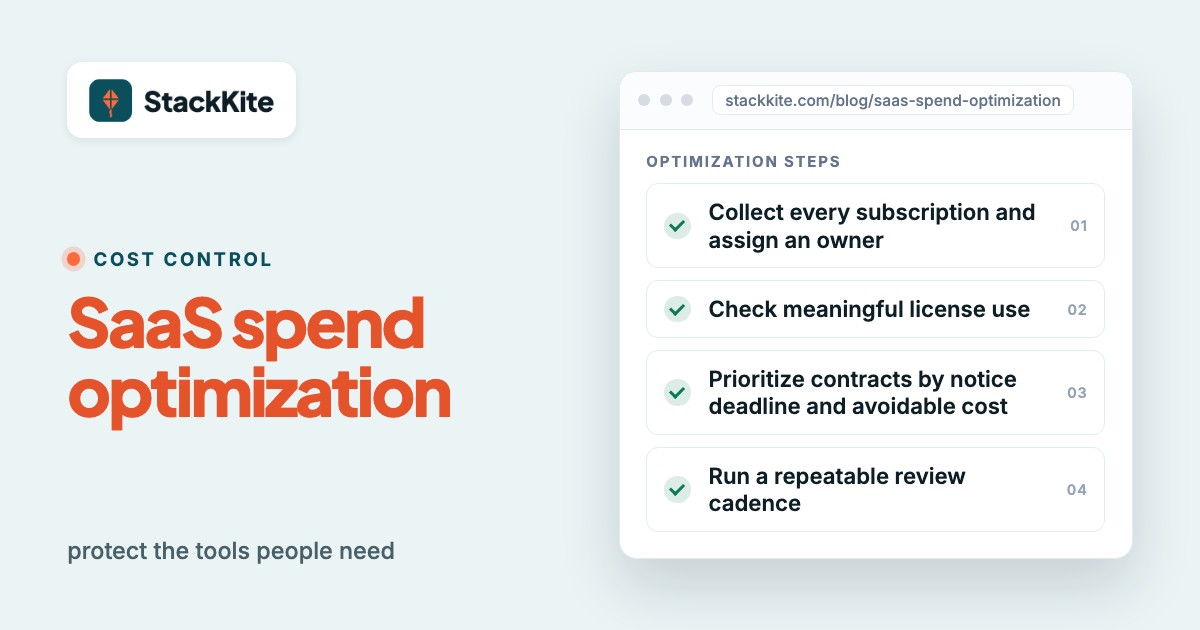
SaaS spend optimization is the process of reducing software waste while protecting the tools people actually need. Start with a complete subscription inventory, compare purchased licenses with meaningful use, and make renewal decisions before notice deadlines. The goal isn't the lowest possible bill. It's the lowest defensible cost for the work your software must do.
A useful optimization program gives every application an owner, a decision date and a reason to keep, change or remove it. It also records the savings that are actually realized, not just the opportunities identified in a dashboard.
- Create one inventory of applications, owners, contracts, costs and renewal terms.
- Separate unused seats, wrong plan tiers, duplicate tools and above-market contracts.
- Start renewal work before the cancellation notice deadline, not on the renewal date.
- Measure savings only after a license change, cancellation or negotiated credit takes effect.
- Keep security, migration cost and business impact in the decision.
What is SaaS spend optimization?
SaaS spend optimization is a repeatable way to find unnecessary software costs and make informed changes. It's about licenses, plan tiers, overlapping applications, renewal terms, contract prices and consumption-based charges. A finance owner may lead the budget review. IT can verify access and usage, while department owners confirm which features are essential.
SaaS spend management is broader. It includes inventory, approvals, budgets, contract records and ongoing reporting. Optimization is the action taken from that information: reclaiming seats, changing a plan, consolidating products or negotiating a better agreement. A company can have accurate spend reports and still not optimize anything. That's more common than you'd think.
The distinction matters because a dashboard that flags unused seats doesn't cancel a contract. An application with few logins may still run a critical monthly workflow. A lower price can be wiped out by implementation labor or the loss of a feature you can't do without. Optimization needs an accountable decision, not a colorful utilization chart. Someone has to own the call.
IBM's June 2026 framework for enterprise SaaS and COTS optimization makes a similar point: organizations should assess whether a system needs to be optimized, consolidated, replaced or intentionally retained. That last option matters. Keeping a tool can be the right outcome, and it's fine to say so when the evidence backs it up.
Which SaaS costs should you measure first?
Measure the cost that can change, not only the amount that appears on an invoice. Begin with annualized committed spend, renewal exposure and license capacity. Then add operational information such as ownership, active use, overlap and contract restrictions. Each field answers a different question.
| Measure | Simple definition | Why it matters |
|---|---|---|
| Annualized spend | Monthly recurring charge times twelve, plus annual subscriptions | Makes different billing cycles comparable |
| Committed spend | Payments the company is obligated to make under signed terms | Prevents treating future contract payments as instant savings |
| Purchased seats | Licenses or entitlements the company pays for | Sets the paid capacity baseline |
| Active seats | Seats with meaningful activity during an agreed review period | Shows potential rightsizing opportunities |
| Notice deadline | Last contractual date to cancel or change a renewal | Defines when a decision must be ready |
| Effective savings | Actual reduction after a change takes effect | Keeps the savings report credible |
A worked example: Suppose a team pays $60 per seat per month for 40 seats. Only 26 seats meet its agreed activity threshold. Fourteen seats are candidates for review. If all fourteen can be removed without a contractual penalty, the maximum annualized reduction is 14 x $60 x 12 = $10,080. That's an opportunity, not realized savings. The contract may fix the quantity until renewal, or some people may need infrequent but important access. Either way, it isn't a saving yet.
Use a consistent review window for each type of tool, because they don't all follow the same rhythm. Daily collaboration software and quarterly financial reporting software don't have the same normal activity pattern. Ask the owner what useful activity looks like before you flag an account as idle.
How do you optimize SaaS spend step by step?
The steps below form a practical review sequence. Some teams will work on renewals and license cleanup at the same time, and that's fine. What matters is that each change has a named owner, a cost baseline and a documented outcome.
Collect every subscription and assign an owner
Bring together accounts payable, card statements, invoices, expense reports and team-maintained lists. Record the application, business purpose, paying entity, department owner, billing cycle, annualized cost, contract document, renewal date and notice period. Ask department heads about tools they've paid for outside central procurement. Don't assume a missing integration means a subscription doesn't exist.
Normalize costs before comparing products
Convert monthly and annual subscriptions into a common annual view. Keep one-time implementation fees separate from recurring charges. Record usage-based minimums, prepaid credits, taxes and currency when they affect the contract. This way you aren't comparing an annual invoice with a monthly plan as if they were the same thing.
Check meaningful license use
Compare paid entitlements with active users, role requirements and access logs where available. Ask the application owner to approve each proposed removal. Include employees who've left, duplicate accounts and seats assigned to teams that don't use the product anymore. Some vendors won't allow reductions before renewal, so record the earliest date a change can take effect. You can't plan savings without it.
Move people to the smallest suitable tier
List the features actually used by each role. A few administrators may need advanced permissions while occasional contributors can work on a lower tier. Test whether reporting, SSO, audit history, data retention or integrations disappear after a downgrade. It's easy to miss one until someone complains. The right tier is the cheapest one that still meets the job and security requirements.
Review overlapping applications by workflow
Group tools by job, not by marketing category alone. What a product's called on its website doesn't tell you what your team does with it. Two products may both offer video meetings yet serve different regulated or customer-facing use cases. Ask which workflows could move, who'd perform the migration and what data you'd lose. Compare the total replacement effort with the expected recurring reduction.
Prioritize contracts by notice deadline and avoidable cost
Create a renewal pipeline that shows renewal date, cancellation notice deadline, owner, annual value and action required. Work backward from the notice deadline. A contract that renews in six months but requires early notice can be more urgent than a flexible monthly subscription that renews tomorrow, because you can still cancel the monthly one next month.
Negotiate with usage and alternatives in hand
Bring a verified seat count, actual feature needs, current terms and credible alternatives to the conversation. Ask for a smaller minimum, price protection, removal of unused modules or a shorter commitment. Evidence makes these requests easier to take seriously. Don't promise a vendor that you'll migrate unless the team has approved a realistic migration path.
Evaluate contract flexibility, not just discounts
An annual discount may look attractive while locking in unused seats. Compare monthly flexibility, cancellation rights, true-up and true-down rules, auto-renewal notice, price increases and support obligations. A lower rate with a rigid minimum can cost more than a flexible agreement when headcount changes.
Connect offboarding to license reclamation
When someone leaves or changes roles, the access owner should review their assigned SaaS seats and remove or transfer entitlements where appropriate. Coordinate this with security offboarding. Revoking access isn't the same as reducing a vendor bill, so the finance owner must also verify the paid quantity.
Review AI and consumption-based charges separately
Track usage units, overage terms, credits and budget alerts for products with consumption pricing. Seats alone won't explain variable invoices. Ask whether unused credits expire and whether the vendor's usage export is reliable. Treat unexpected consumption as a forecasting and control issue. It isn't automatically waste.
Run a repeatable review cadence
Assign monthly exception checks, quarterly portfolio reviews and an owner for every upcoming renewal. Preserve the before-and-after price, decision and approval in the record. A one-time cleanup is useful, but the same waste returns when purchasing, onboarding and renewals don't have continuing controls.
What should the first audit include?
Start with a manageable slice instead of waiting until you've got perfect company-wide discovery. Choose the largest upcoming contracts and a few common seat-based tools. For each one, gather the invoice, order form, renewal terms, admin seat export and business-owner confirmation. A finance spreadsheet can be enough for a small portfolio if someone owns updates and review dates.
Don't rely on login counts alone. A service account may have no interactive login. A specialized design seat might be used only when a client requests changes. Conversely, someone can log in every day and never touch the paid features that justify an expensive tier. The business owner should explain the actual work before anyone changes the contract.
How should you decide what to cut first?
Prioritize by potential savings, urgency, confidence and low disruption risk. A $900 monthly duplicate application might be a bigger opportunity than a $60 unused seat, but it's also likely to need weeks of migration. A simple score can keep the team focused, provided it's treated as a discussion aid rather than a precise financial forecast.
Give each opportunity a score from one to five for potential savings, urgency and confidence. Score disruption in the opposite direction: five means low disruption. Add the four values and review the highest scores first. The weighting is a local management choice. It's not an industry benchmark.
| Opportunity | Savings | Urgency | Confidence | Low disruption | Total |
|---|---|---|---|---|---|
| Remove confirmed idle seats at renewal | 4 | 5 | 5 | 5 | 19 |
| Downgrade advanced tiers for occasional users | 3 | 4 | 4 | 4 | 15 |
| Consolidate two overlapping platforms | 5 | 3 | 3 | 2 | 13 |
The scores above are illustrative. The right ordering changes when a contract is locked, an integration is critical or the vendor has a near-term notice deadline. Document the assumptions beside the score so a new owner can see why you chose it.
What does a 90-day SaaS cost optimization plan look like?
A short project works best when it produces a decision register, not just a presentation. The plan below is an operating example. Adapt the pace to the number of applications and the time required to access invoices and contracts.
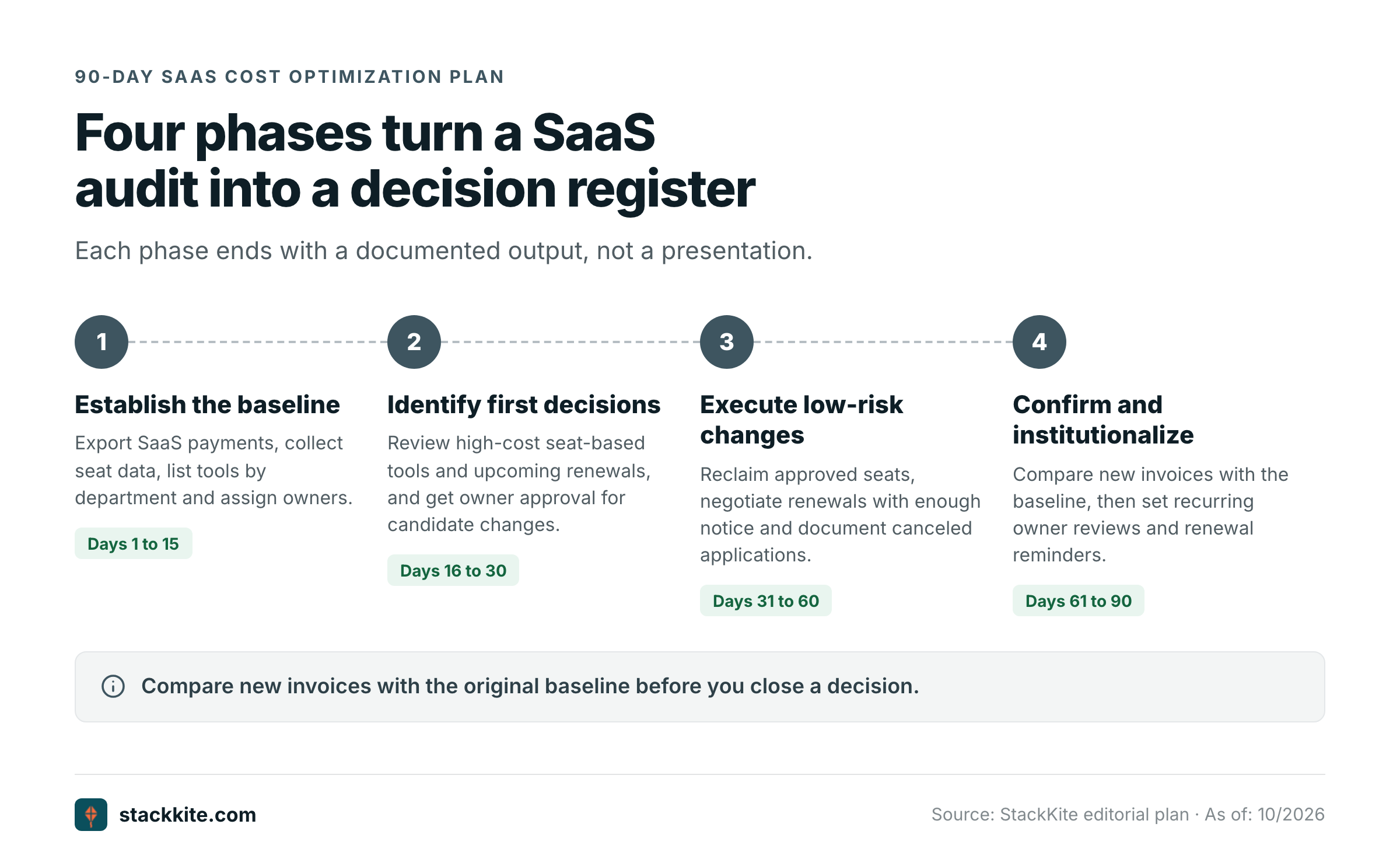
Days 1 to 15: establish the baseline. Finance exports recent SaaS payments, IT collects available seat and identity information, and department leads list their tools. Combine duplicates and assign owners. Flag contracts with missing renewal dates or notice periods as information gaps, not as safe-to-cancel subscriptions.
Days 16 to 30: identify the first decisions. Review high-cost seat-based tools, upcoming renewals and overlapping categories. Ask owners to approve candidate reclaims and tier changes. Separate actions possible now from those restricted by contract. Create an evidence folder for each material decision so you're not hunting for emails later.
Days 31 to 60: execute low-risk changes. Reclaim approved seats, negotiate renewals while there's still enough notice, update purchasing controls and document any canceled applications. Track expected savings and effective dates. Don't start a large migration just to make the first report look impressive.
Days 61 to 90: confirm and institutionalize. Compare new invoices with the original baseline, verify that users still have the access they need and close the decisions that produced real savings. Set recurring owner reviews and future renewal reminders. Escalate unresolved contracts before their notice deadlines, not after they've passed.
- Every paid application has a named business owner and a paying department.
- Annualized cost and committed contract value are recorded separately.
- Renewal date and cancellation notice deadline are both known.
- Purchased seats and meaningful active seats have a documented review window.
- Each proposed removal or downgrade has owner approval.
- SSO, security, retention and integration needs were checked before changing tiers.
- Migration effort is included when comparing overlapping products.
- Potential savings, signed decisions and realized savings have separate fields.
- The next review date is assigned before the current audit closes.
How do you calculate SaaS savings without overstating them?
Use three different figures: opportunity, contracted reduction and realized savings. An opportunity is the annualized cost of capacity that appears unnecessary. A contracted reduction is the change documented in a vendor agreement. Realized savings are the lower costs that actually take effect over a defined period.
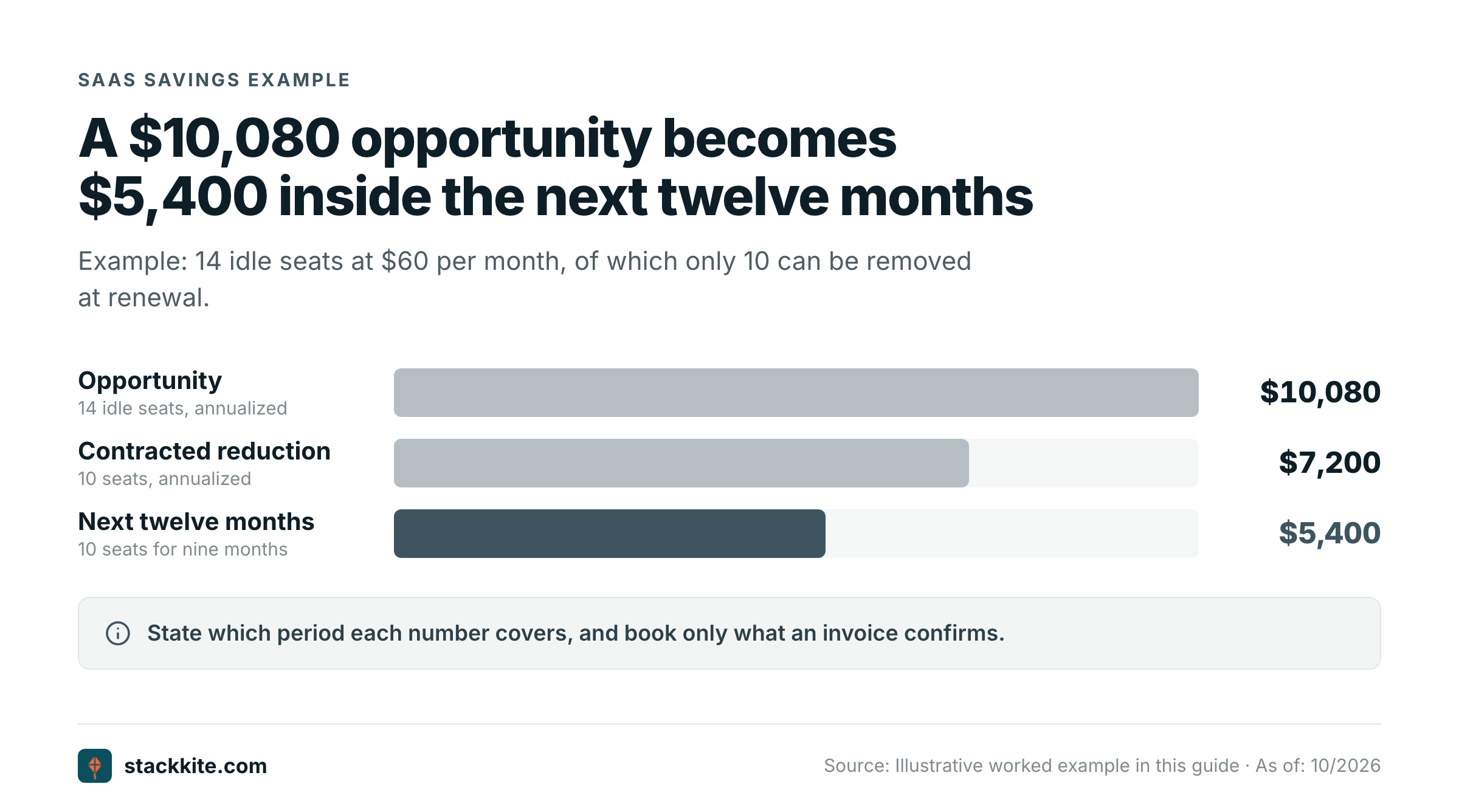
For example, a team identifies 14 idle seats at $60 per month. The annualized opportunity is $10,080. The vendor lets you remove only 10 seats at the next renewal. The signed annualized reduction is 10 x $60 x 12 = $7,200. If the new term begins three months from now, only nine months of that reduction fall into the next twelve-month reporting window, or 10 x $60 x 9 = $5,400. State which period each number covers.
Avoid counting the same reduction twice. If a department cancels one product and moves its users into another, subtract any extra licenses, migration fees and overlap months before reporting net savings. If a vendor offers credits instead of a recurring price change, report them separately. They aren't the same kind of saving. A credit improves cash flow once, but it doesn't necessarily lower the next renewal price.
A defensible savings register includes the original invoice or contract, the approved action, the new order form, the effective date and the first lower invoice. That's enough to explain the result to finance without pretending that every identified opportunity turned into cash.
What are the most common SaaS optimization mistakes?
Treating every inactive login as waste. Low activity is a prompt for review. It isn't proof that the license is unnecessary. Some tools support rare but critical tasks, and those don't show up in login counts. Validate with the owner before reclaiming access. They'll know what the tool is really for.
Ignoring notice periods. A team can find an excellent saving and still miss the contractual window to act on it. Track the last notice date separately from the renewal date. Start planning early enough to evaluate alternatives and get approvals. You'll need the time.
Comparing unlike prices. A self-service plan, an enterprise agreement and a usage-based service may have different minimums and included features. Normalize billing periods and document what each price includes. Otherwise you're not comparing like with like.
Cutting the cheaper product without testing the replacement. A feature checklist doesn't prove that a migration will work. Test the workflows, data exports, permissions and integrations that matter. Count the labor it'll take to move.
Assuming discovery is automatic. Some enterprise platforms connect to finance, identity and SaaS systems. A manual tracker doesn't discover applications or usage by itself. If the team uses spreadsheets or a manual inventory tool, assign someone to update the records and verify the data.
Calling an opportunity a saving. A dashboard estimate may be useful for prioritization, but the invoice and contract determine the financial outcome. Keep projected, contracted and realized amounts separate.
Do you need a SaaS management platform to optimize spend?
Not necessarily. A small team can begin with invoices, a spreadsheet and a disciplined renewal calendar. The limiting factor is often ownership rather than software. If nobody updates the inventory or follows through on contract decisions, a more expensive platform won't solve the process problem by itself.
A larger organization might benefit from automatic discovery, finance integrations, identity data and usage analytics. Those capabilities help when subscriptions are spread across many departments and contracts, since nobody's tracking them in one place. Compare the platform cost with the value of the data and workflows it actually automates. If you wouldn't use them, don't pay for them.
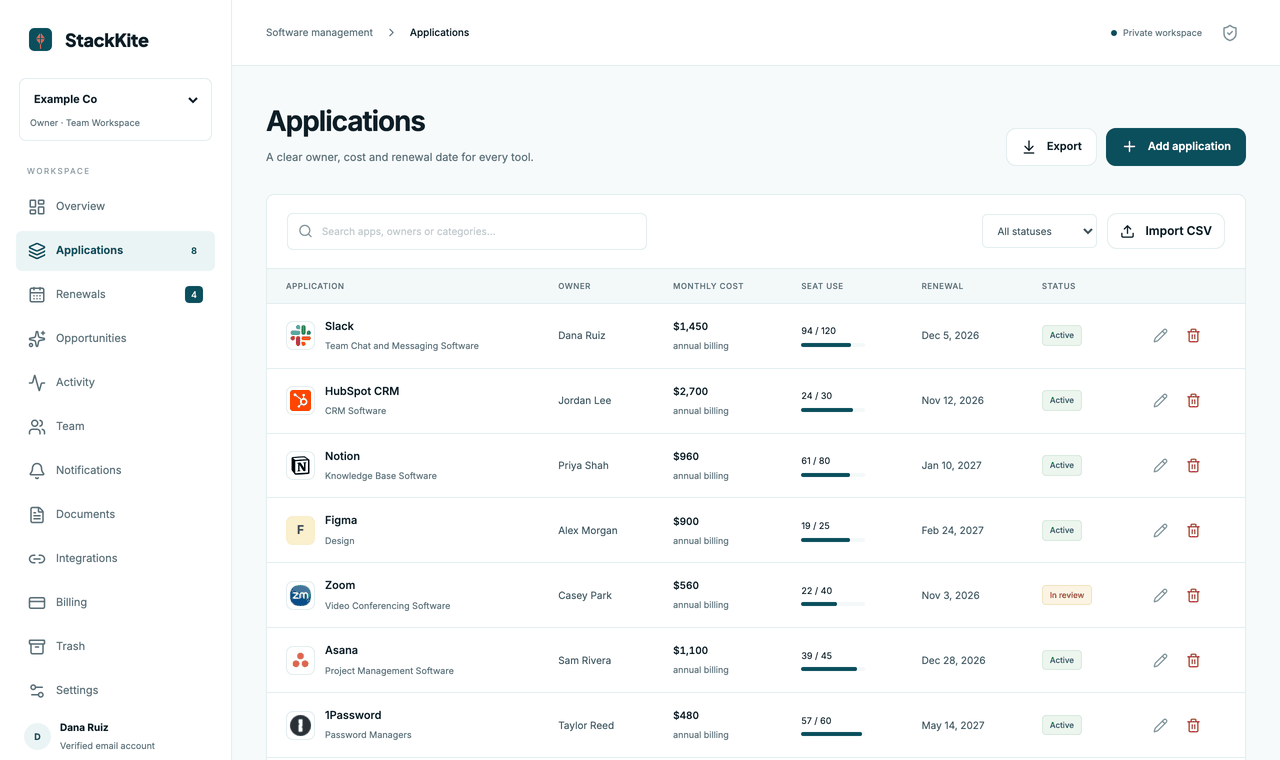
StackKite, the publisher of this guide, is one narrower option for teams that want a shared, manual SaaS inventory. It records application owners, costs, purchased and active seats, renewal dates and notice periods. It supports CSV imports and exports, but it does not automatically discover applications, connect to bank accounts or measure user activity. Its published Team plan is $19 per month per workspace. That distinction matters: it can organize decisions, but your team still has to enter accurate information and carry out the cancellations. You can review its current scope on StackKite's features page.
If you're comparing software categories before replacing an overlapping tool, the SaaS spend management directory provides a separate buying comparison. Use that to shortlist systems, then go back to your own contracts to work out whether a switch is worthwhile.
What should happen after the first optimization cycle?
Every material subscription needs an owner who can state three things: the business result the tool supports, the date its next term must be decided, and the evidence that would justify changing its paid capacity. The answers should be visible to finance and IT before renewal work begins. If they aren't, nobody can act in time.
Review large or unusual changes monthly and the overall portfolio quarterly. Keep a log of approvals and outcomes. When someone buys a new tool, capture its owner, price, contract and notice period at the start. That single habit stops much of the cleanup work from coming back.
The most useful result is a smaller set of unresolved decisions, each with a deadline and an accountable person. Cost control improves when teams can explain why they pay for a tool and when they'll reconsider it.
SaaS spend optimization FAQs
What is the difference between SaaS spend management and optimization?
Spend management records and governs software costs. Optimization uses that information to reclaim seats, change tiers, consolidate tools and improve contract terms.
How often should you review SaaS spending?
Check upcoming renewals and unusual changes regularly, then review the full portfolio on a recurring schedule such as quarterly. Adjust the cadence to contract risk and team size.
What is the fastest way to reduce SaaS costs?
Review confirmed unused seats and upcoming renewals first. They can be simpler to change than replacing an entire application, but contract restrictions still apply.
Can SaaS spend optimization work without automatic integrations?
Yes. A maintained inventory, contract files, seat exports and accountable owners can support sound decisions. Manual tracking requires disciplined updates and doesn't provide automatic discovery.
How should you report SaaS savings?
Separate annualized opportunities from signed contract reductions and savings that have actually taken effect. Keep supporting invoices and effective dates.
Should you cancel software with low usage?
Not automatically. Check whether the tool supports a critical periodic workflow, whether the contract permits cancellation and what replacement work would cost.